2026
August
12th August 2026
Happy Wednesday! 🥳
Well, July really zipped along, and now it's August already - yikes. This year is really racing ahead.
Apologies for the radio silence, I did intend to post more in the second half of this year, but it hasn't worked out that way yet. Sorry!
It's certainly interesting and crazy times... I'm seeing more and more people jumping on the LLM bandwagon and building apps specifically for video editors, especially for Final Cut Pro editors.
Almost every day I get a new message about a new tool - but most of them are not code-signed or notarised by Apple (a big warning sign if the developer can't afford USD$99/year), a lot of them accidentally bundle their own source code (opps!), and many of them contain clues that someone has just told an LLM to reverse engineer an existing app and just copy it.
I'm also constantly getting screenshots from people showing an LLM referencing my public code or a FCP Cafe post - it's a crazy world, where most visitors to FCP Cafe are machines and not human!
Now that anyone can make anything (with enough time and tokens) - it really opens up a world of possibilities - and I'm starting to see some really cool and innovative products hit the market. But there's also a lot of weird implementations.
Over the coming weeks and months I hope to have some time to really dig into some of these new tools, and explore them in detail for FCP Cafe. Stay tuned.
If you find anything that's really cool and useful, please feel free to share!
In developer news, FxFactory reports:
Final Cut Pro 12.3, the most recent version available via the Mac App Store, regrettably includes a regression that affects all third-party plugins that perform frame-by-frame video analysis.
You can read more on the FxFactory blog.
Catching up on my own tools, CommandPost v2.1.0 is finally out!
This release includes the following bug fixes:
- Fixed applying Effects & Transitions in Final Cut Pro v12.3. As of Final Cut Pro v12.3 you can no longer use the Accessibility API to programatically change the Search textboxes - annoyingly, they are now all read only. As a workaround we now have to use the Pasteboard to paste in the required text to trigger a search. Thanks to EVERYONE who reported this issue!
- Fixed the Save Timeline Index to CSV action for Final Cut Pro v12.3. Thanks to EVERYONE who reported this issue!
- Fixed a bug where the Effects actions could fail to load if there's a Motion Template with an invalid Property List file. Thanks for reporting freppair!
- Fixed menubar actions when using the Final Cut Pro v11 free trial. Thanks for reporting CharlesTeton!
You can download and learn more on the CommandPost website.
There were quite a few under-the-hood changes in terms of the Accessibility API for Final Cut Pro v12.3, so there may be other bugs that still need to be addressed - please let us know if you run into any issues with CommandPost!
Keyframe Toolbox v1.5.0 (Build 57) is also out now, with some great additions.
🔨 Improvements:
-
Audio can now be imported into keyframe graphs.
- To animate a parameter along to an audio track, you’ll need an audio file from the same part of your timeline as the clip you’re animating with Keyframe Toolbox. The audio file needs to be the same length as the clip to which Keyframe Toolbox has been applied. If you don’t have the audio file already, an easy way to create this file is to:
- Press R, to select the Range Selection tool.
- Click the clip you plan to animate, to select it as a range.
- Choose File > Share > Export File (⌘E) and save an audio-only file as a WAV.
- In Keyframe Toolbox, choose the parameter you want to animate, such as Scale, click the graph menu, then choose Import Audio as Graph.
- After processing, controls appear below the graph:
- Upper limit — the highest value produced.
- Lower limit — the lowest value produced.
- Bend — to smooth the transition between keyframes. This will not be visible with shorter clips, where one keyframe will be added for each video frame, but can be important for longer clips.
- Number of keyframes — lower numbers are faster to work with, but less precise. The maximum value is 1000, and it’s recommended to limit the duration of audio to about 5 minutes.
- Lower Frequency — the lowest frequency recognised.
- Upper Frequency — the highest frequency recognised.
- Control the lower and upper frequency values to reveal specific instruments or sounds from your exported file.
- Important: the Upper and Lower limit of the audio controls are set beyond the Upper and Lower limits of the graph, the audio graph will be clipped. This allows you to remove quieter parts of the graph by setting the audio lower limit to a lower value than the graph’s lower limit.
- As with the presets, the controls disappear if you move a keyframe manually.
-
Optional Scale X and Scale Y graphs have been added. Thanks for requesting, yoggypap and many others!
- If you wish, enable "Scale X" and/or "Scale Y" graphs in Settings.
- You can use any combination of Scale, Scale X and Scale Y that you wish.
-
Velocity graphs have been added. Thanks for requesting, Alex Lindsay!
- Enable "Velocity" in Settings to show a velocity graph behind each keyframe graph, instead of the default grid lines.
- The Velocity graph shows change in speed, is scaled automatically to fill the space available, and cannot be edited directly.
-
Numeric editing for all below-graph controls and limits, including the new Import Audio to Graph feature.
- Double-click any value or limit, then type a number, or use up+down arrows to change values by 1. Add Shift for ±10, Option for ±100.
-
Opacity can optionally fade to black. This helps to avoid strange results when applying some third-party filters after Keyframe Toolbox is set to a low opacity. Note that this can also be an issue with FCP’s built-in opacity controls.
🐞 Bug Fixes:
- The Fit button to the right of the graph now expands to show handles on all keyframes.
You can download and learn more on the Keyframe Toolbox website.
ScriptStar v1.6.1 (Build 35) is also out now, with the following changes:
🔨 Improvements:
- The transcription language can now be explicitly set when using Whisper.
- When using the Whisper model for transcription, it's now possible to manually choose the language. This can help if the wrong language is chosen automatically. Note that Parakeet always auto-detects the transcription language.
🐞 Bug Fixes:
- The Options panel could sometimes obscure other parts of the user interface.
- The way in which we combine multiple audio channels before transcription has been improved; this should make quiet transcriptions with multi-channel audio files more reliable.
- In some circumstances, digits (0-9) weren't always separated correctly from the neighbouring word; this has been fixed.
You can download and learn more on the ScriptStar website.
There's also some new interesting tools to explore such as, CoreTrim, by Tony Black, who also created FontAudition.
CoreTrim is a Workflow Extension that exports a Final Cut Pro project with only the media the timeline actually uses, trimmed by stream copy with no re-encoding, and relinked so it imports back into Final Cut identically. Every source must prove it can be trimmed flawlessly before CoreTrim commits to a method, and the finished archive — media and project file alike — is verified again before it ships. Originals are never touched, anything that can't be proven safe is copied in full, and every export includes a report of exactly what was done. Multicam projects can keep all angles or be checkerboarded down to the shots in the cut.
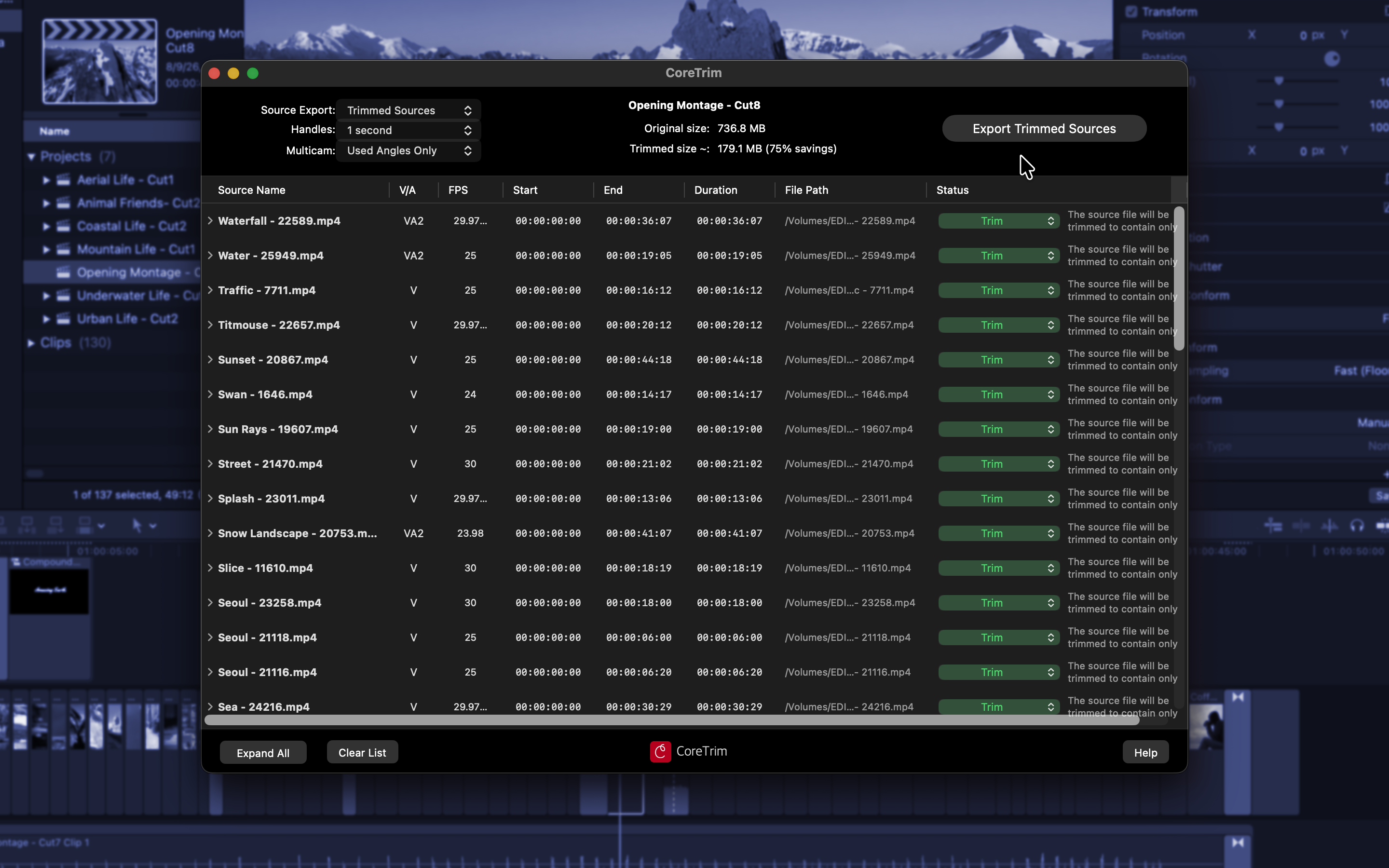
You can download now on the Mac App Store and learn more on the CoreTrim website.
Footage Manager also looks really interesting.
Reconnect missing Final Cut Pro media Analyze libraries, find media across SSDs and NAS, then repair or move it in one flow.
You can learn more on the Footage Manager website.
Metaman also looks very useful, for anyone who's ever used Wave Agent:
Metaman is the Metadata Manager built into Aurista, also available as a standalone free tool for everyone. It is a modern replacement for Wave Agent, which has grown long in the tooth. Open WAV files, edit scene, take, tape, notes, track names, circled / wild, and timecode, then save back into the files. Generate custom Sound Reports with your company, crew, and logo (PDF / CSV / ALE).
- Drag-and-drop or open multiple WAVs
- Edit production metadata and track names
- Write changes back to BWF / iXML
- Play any file from the list with a graphical track mixer
- Live playback timecode (23.976 / 29.97 DF & NDF / 24 / 25 / 30 / 59.94)
- Generate custom Sound Reports (PDF / CSV / ALE) with company, crew, and logo
You can download and learn more on the Metaman website.
Final Crack Pro allows you to convert FCP7 projects into FCPXML, which is fun!
It looks like it's entirely vibe-coded, and is a mixture of Python scripts and a web browser UI, so tread with care - but it's cool to see people building these kinds of crazy open-source projects.
You can learn more on GitHub.
Custom Title Path is now available on FxFactory which is worth testing out!
Thanks team!
Sync-N-Link X v1.3.9 is out now with the following change:
- Bug fix for audio offset when creating multicam clips
You can download and learn more on the Mac App Store.
MC Auto Cut v1.0.10 is out now with the following changes:
- Adds a feature to create sample audio files and bundle them with diagnostic logs for users who want to share their results with us so we can improve the algorithm
- Now warns user when their mutliple audio tracks have the same content, which is a problem if you want to have per-speaker automatic editing which needs individual and different audio angles for each speaker
You can download and learn more on the Mac App Store.
FontAudition WFE v2.0.2 is out now with the following changes:
- Much faster view switching: Universal View and Font Families View now swap instantly, even with thousands of fonts installed. Hiding fonts, starring, and collections respond faster too, and the font grid now updates automatically when you install or remove fonts. And collection export is all new: it now saves a styled specimen page showing every font in your collection - shareable with anyone, even if they don't have the fonts installed. Plus: an easier way to show hidden fonts (right-click the grid), a confirmation before deleting a collection, and style filtering that now recognizes many more fonts - in collections too.
You can download and learn more on the Mac App Store.
Cut Shelf v1.1.3 is out now with the following changes:
- Tooltips now show full clip name when the name is truncated in the shelf
You can download and learn more on the Mac App Store
EDL-X v2.15 is out now with the following changes:
- Updated to process FCP XML Version 1.14
You can download and learn more on the Mac App Store
Creator's Best Friend v1.3.9 is out now with the following changes:
- Bug fix for a workflow extension crash
You can download and learn more on the Mac App Store
ScriptBlade v2.0.4 is out now with the following changes:
- Improved FCPXML export reliability for synchronized clips.
- Fixed an issue where Break Apart Clip Items could create excessively long gaps in Ripple timelines.
- Improved preservation of synchronized camera and audio tracks.
- General stability improvements.
You can download and learn more on the Mac App Store.
captionTranslator v1.0.7 is out now with the following changes:
- New feature: translates Subtitles in your project
- Bug fix for translating to multiple languages
You can download and learn more on the Mac App Store.
SendToX v1.2.10 is out now with the following changes:
- Bug fix for identifying the installed Final Cut Pro's bundle ID
You can download and learn more on the Mac App Store
X2Pro v5.0.53 is out now with the following changes:
- Handle graphics files in projects.
You can download and learn more on the Mac App Store
Media Sync Tool v2.0.2 is out now with the following changes:
- Improved shooting-day grouping — numbered folders and unconventional layouts now sync correctly.
- "Convert Scene metadata to keywords" option no longer requires Clip Logging to be enabled.
- Fixed sync skipping sound clips with a surround channel layout.
You can download and learn more on the Mac App Store