Building First Rush
How a Korean on-set editor ended up building a macOS SDI recorder for the Final Cut Pro workflow.
How I got here
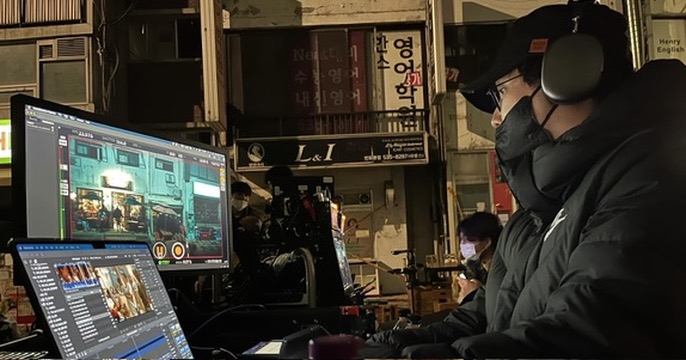
I'm a film and television editor based in South Korea.
I started cutting in 2004, while I was still in high school. My first tool was Adobe Premiere 7.0, and that's where I first picked up a feel for what editing actually is — joining shots, building scenes, watching them breathe. It started as something I did because I loved movies, but over time editing became the center of my life.
Later I went to Seoul Institute of the Arts to study film, and that's where I switched to Final Cut Pro 7. From that point on, my workflow gradually pulled toward Final Cut.
I haven't only ever used one tool though. When I was working at an ad agency I cut on Avid Media Composer, and through that I got exposed to the broadcast and commercial side of editing systems too. Eventually I moved into a feature film cutting room and ended up back on Final Cut Pro, and that's where I settled in for good.
So I'm not a Final Cut Pro editor just because it's what I happen to know. I started on Premiere, went through Final Cut Pro 7, and used Avid Media Composer professionally. After working in a few different editing systems, I think I see Final Cut Pro's strengths more clearly than I would have if it had been my only tool.
The architecture introduced with Final Cut Pro X can feel unfamiliar at first, but if you think about it from the perspective of on-set editing and the post pipeline together, it's genuinely powerful. The way it organizes clips, the way it leans on metadata, how fast you can search and sort, how quickly you can get raw footage into a state you can actually edit from — Final Cut Pro does these things differently from other tools, and in a way that matters.
That's a big reason First Rush is built so deliberately around the Final Cut Pro workflow. Not just because I personally like Final Cut, but because after using the alternatives, I genuinely feel its speed and its way of organizing material are real advantages on a Korean film or television set.
On-set editing in Korea
I'm still working toward becoming the lead editor on a feature, but I'm getting there. Right now I work as an on-set editor on Korean films and television series, sitting between the shooting set and the cutting room.
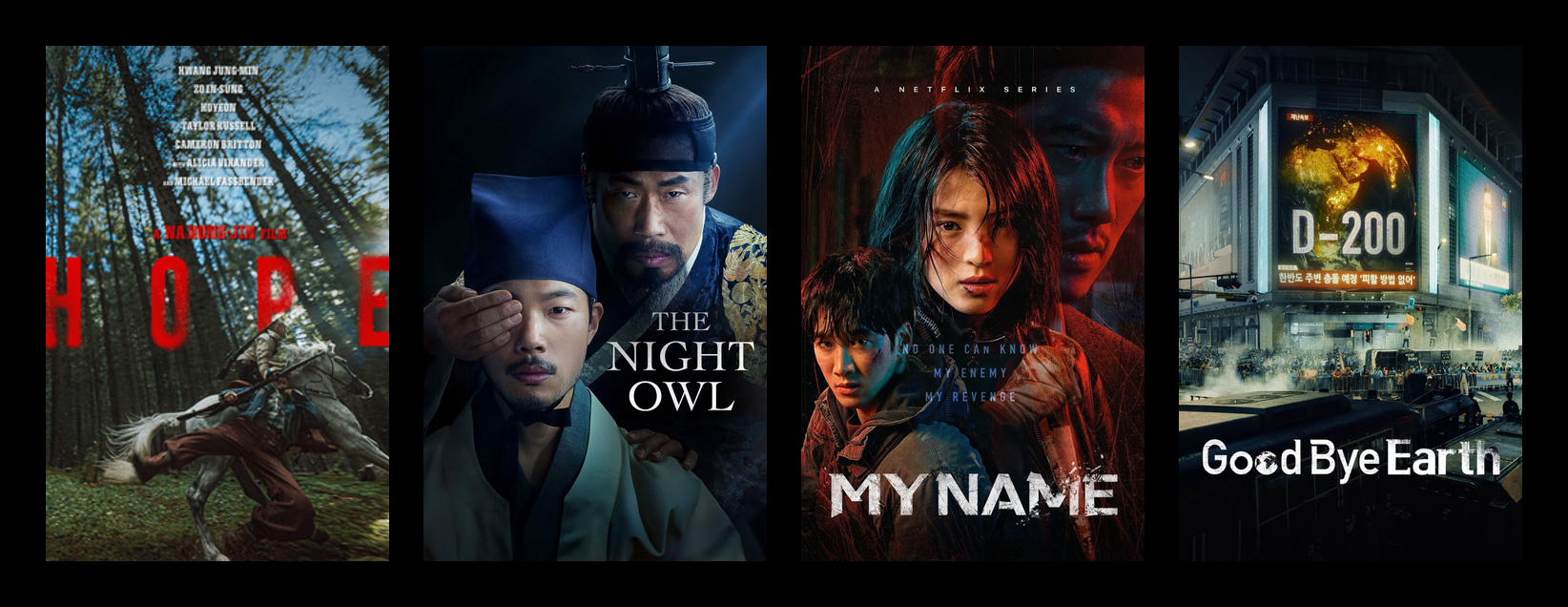
Recently I've worked as an on-set editor on Hope (which premiered at Cannes), the feature The Night Owl, and the Netflix series My Name and Goodbye Earth.
On a Korean film or television set, on-set editing isn't just about backing up footage or monitoring takes. You're capturing SDI feeds from the cameras, recording them, checking the takes quickly, organizing scene/shot/take information, and getting everything ready so it can drop straight into the editorial flow if needed.
The set never stops moving, and the editorial side has to keep up with that rhythm. The on-set editor is really a connector — between the camera team, the script supervisor, the DIT, the assistant director, and the cutting room. A good on-set editing system isn't just "a system that saves files." It's a system that keeps the rhythm of the set from breaking.
The setup I had before
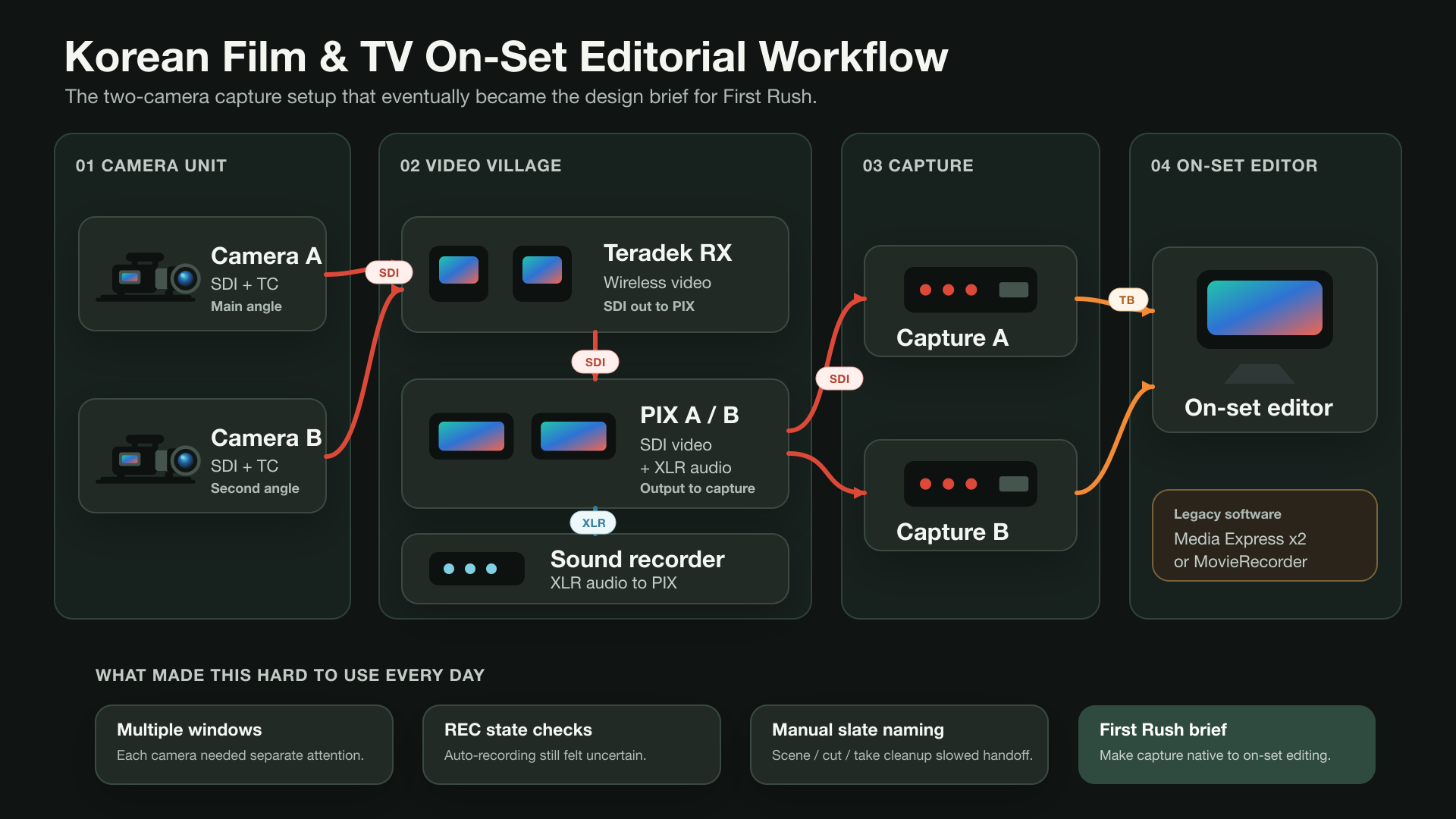
When I first started doing this job on set, I used Blackmagic Media Express, the basic capture app from Blackmagic Design. When I needed to take in two cameras at once, I'd open two Media Express windows and record each SDI input in its own window.
It worked, technically. But it wasn't really comfortable for everyday on-set use. I had to manage two separate windows, it was hard to read the recording state at a glance, and keeping the file names and metadata aligned with how on-set editing actually flows was something I had to constantly babysit by hand.
So I bought Softron's MovieRecorder for a more proper multi-camera recording setup. MovieRecorder is genuinely a great piece of software, and compared to scraping by with Blackmagic Media Express, it was a much more stable and professional tool.
But once I started using it day in and day out on real Korean film and television sets, there were still rough edges that bothered me.
The biggest one was auto-record and naming. On set, recording needs to start and stop naturally with the camera's REC state, and file names need to track scene/shot/take in real time. In practice I still found myself watching the auto-record state to make sure it was behaving, and the way scene/shot/take naming was handled didn't quite match the rhythm of how I actually work.
An on-set editor isn't just someone watching a record button. You're watching the camera state, checking the script and slate, and getting ready for the next take the moment one ends. If, in between all that, you also have to rename files, second-guess whether something actually recorded, or keep verifying that metadata went in correctly, your attention starts fragmenting.
Eventually I kept coming back to the same thought:
I wish there were a recording app built around how on-set editors actually work.
How First Rush started
I didn't just need an app that takes an SDI signal and writes ProRes. I needed an app that understood the way an on-set editor actually thinks while working. Something that follows the camera's REC state, reads the timecode, lets scene/shot/take info flow naturally into the file name, and hands off to Final Cut Pro in as organized a state as possible.
I didn't set out to build the app myself. I'm an editor, not a developer, and I'd never formally studied Swift or macOS app development.
At some point I discovered what people now call vibe coding: building software by describing the workflow clearly, letting AI help turn that into code, and then testing every rough edge on real sets until it behaved like a tool I could actually trust.
That's how First Rush started.
First Rush wasn't conceived as something that would replace giant commercial software. I just wanted to chip away at the small frictions I was hitting every day on set. I wanted to feel less anxious about whether a recording was actually rolling. I wanted file names to match the flow of the set. I wanted camera metadata and slate info to attach themselves as automatically as possible. I wanted the handoff to the cutting room to feel a little smoother.
In other words, First Rush didn't come out of a developer's imagination. It came out of an on-set editor's exhaustion.
The flow matters more than the recording
While building First Rush, the thing I cared most about wasn't the "recording feature" itself. Recording obviously has to be rock solid. But the bigger problem on set is everything around the recording.
Which camera is currently in REC. Whether timecode is coming in. Whether audio is alive. Whether ANC metadata is making it through. Whether OCR caught the slate. Whether the file name is queued up correctly for the next take. On set you have to read all of that, fast.
So First Rush isn't just an app with a giant REC button on it. The goal was a tool that lets you see the state of multiple SDI sources at a glance and lets a take flow straight into the editing pipeline the moment it wraps.
I started with Blackmagic DeckLink and UltraStudio devices, and from there I started thinking about AJA hardware too. Working with SDI capture hardware on macOS is nothing like building a regular UI app. You have to think about frame timing, ProRes encoding, disk writes, timecode, the REC flag, the differences between vendor SDKs, and all the weird real-world edge cases the set will throw at you.
But the reason I kept hammering on all of those technical problems was simple. I wanted to build a tool that lets editors work with less anxiety.
Metadata and OCR
One of the core ideas in First Rush is metadata.
In theory, an SDI signal carries timecode, the REC flag, and some camera metadata. In practice, on a real set, it's never that clean. It varies by camera model, it varies by SDI output port, and depending on what gear is in the chain, ANC data can simply disappear. Some information only appears while recording. Some shows up on the monitor but never makes it into SDI metadata at all.
That's why First Rush doesn't only trust ANC metadata — it also uses OCR.
The information shown on the camera's HUD or on the slate overlay — scene, shot, take, reel, ISO, shutter, white balance — matters enormously to an on-set editor. Ideally that info comes through as standardized metadata, but when it doesn't, the set doesn't stop. You have to be able to read what's on screen and feed it back into the workflow.
OCR isn't a perfect answer either. So in First Rush I tried to be careful about the relationship between values the user has manually edited and values that came in automatically. Automation has to be convenient, but it should never overwrite something the on-set editor has corrected by hand. That balance was something I kept coming back to throughout the build.
A tool aimed at Final Cut Pro
First Rush is a recording app, but in my head it was always an app that reaches all the way to Final Cut Pro.
The files made on set eventually have to land in the cutting room. And in the cutting room, what matters isn't just "the file exists" — it's which scene, which shot, which take, which camera, and what the timecode looks like.
Final Cut Pro becomes powerful when that information is organized well. Keywords, reels, roles, metadata, search and sorting, multicam — it all flows quickly when the foundation is right. So I designed First Rush to leave file names, slate info, timecode, and camera source info in as edit-ready a form as possible.
What I wanted was for the files made on set to arrive in the cutting room not as something the editor has to reorganize from scratch, but as something the editor can already understand.
AI and on-set testing
When I was building First Rush, AI was the tool that let me start in the first place. But what made the app actually usable was on-set testing.
AI can help you with code, but it can't feel the anxiety of being on set for you. What should the app do when the signal blips for a moment? How should recording behave when the REC flag flickers? Do the file names read naturally in a real shoot? Which piece of information should be visible first when you're watching multiple cameras at once? The only way to know any of that is to actually use the thing on set.
So First Rush was built and rebuilt on real sets — with real cameras, real SDI chains, real shooting schedules, real take names, and real mistakes and real anxiety to push against.
The fact that I didn't start out as a developer is a weakness in some ways, but it also helped shape First Rush in a useful way. I don't tend to look at the app and ask "what feature would be cool here?" I look at it and ask "would I be able to switch this on tomorrow on set and actually work with it?"
Growing beyond recording
For a while, First Rush really was just a recorder with the on-set workflow wrapped around it. But the more I used it on set, the more I noticed that the moments where I felt stuck weren't only about getting the file written. They were about everything that happens around a take while the set is waiting.
So First Rush slowly grew, one on-set frustration at a time.
Every camera at once
The most basic piece — the one that started all of this — was simply being able to run every camera from one window instead of juggling several apps. First Rush lays the inputs out in a grid, anywhere from a single camera up to a 4×4 of them, so you can read the whole shoot at a glance. ⌘-click to group cameras and they start and stop together, gang-recorded in sync. And when several cameras need the same overlay, LUT, destination, or auto-record setting, you can select them all and apply it in one pass instead of configuring each by hand.
There's also a vertical mode for the way a lot of content gets shot now — mount a camera sideways at 90° or 270° and First Rush rotates both the live preview and the recording to true 9:16 portrait, so Reels, Shorts, and TikTok material comes off the set already the right way up.
Sound, too
A picture without sound isn't much use when you're reviewing a take, so First Rush takes in SDI embedded audio — up to 16 channels at 24-bit / 48 kHz — with per-channel gain and routing. And because audio and video don't always come down the same cable on set, you can route the audio from any camera into the recording tracks of a different clip, so a take ends up carrying the sound that actually belongs to it.
Reviewing a take, right there
The first thing that pushed it past "just recording" was playback.
When a take finishes, the first question on set is almost always the same: can we see it again? The director wants to check a performance, the DP wants to look at a move, the script supervisor wants to confirm a detail. Spinning that up in a separate player, finding the file, scrubbing to the right spot — all of that costs time the set doesn't have.
So I built playback directly into First Rush. You can replay the take you just recorded immediately, set IN and OUT points, loop a section, step a frame at a time, or run it from quarter speed up to double speed. And because everyone on set is already looking at the SDI monitors, that playback can go back out over SDI — with timecode and audio — to the same monitors. Pause, and the frame holds on the monitor. If there's no SDI output card in the chain, it just plays back inside the app instead.
Judging the image, not just capturing it
The next thing was being able to trust what I was looking at.
On set, color and exposure decisions don't wait for the cutting room. People want to know, right now, whether something is clipping, whether the skin tones are sitting where they should, whether two cameras match. So I added a live grade and a full set of scopes.
The grade is CDL-based — slope, offset, power, plus exposure, contrast, temperature, and tint — and it supports look presets, copy/paste between cameras, ASC .cdl import/export, per-source 3D LUTs, and secondary windows for shaping just one part of the frame. The scopes are the ones you'd actually reach for: waveform, RGB parade, vectorscope, and histogram, each one toggleable and openable in its own larger window, updating live with the source and following its color space, including HDR.
And there's a detail I care about a lot: if you want, the look you built on the monitor can be baked into the recording. The color you trusted on set is the color that lands in the file — not a separate thing the cutting room has to reverse-engineer.
Compositing on set
This one started as something I thought might be overkill, and turned out to be one of the features people react to most.
First Rush can composite in real time. You can pull in a previous take, a still image, or the live feed from another camera as a reference, and combine it with the current camera using chroma key, a blend-mode mix, an angle-and-feather wipe, or a difference view. The chroma keyer has spill suppression, edge choke, and a matte preview.
On a greenscreen day, that means you can check the key on set instead of hoping it works in post. For continuity, you can lay the current frame over a previous take and see what moved. The composite shows up as its own tile in the viewer grid, right next to the clean camera tiles, so the original feeds stay untouched. And whether it's that processed picture — the look, the composite, even a rotation for side-mounted action cameras — or a clean pass-through of the input, you can choose what goes back out over SDI as a program feed.
What everyone else sees
The other recurring problem on set was simpler and more human: there's one good monitor, and too many people who need to see it.
So I built First Rush Viewer, a companion app for iPhone and iPad. The Mac running First Rush still does all the real work — SDI capture, ProRes recording — and the iOS devices act as live monitors over the local network. Pairing is a six-digit code or a QR scan, you can lay out one to four cameras at once, and there are stream diagnostics for frame rate, jitter, latency, and dropped packets so you can tell whether a hiccup is the network or the feed. It's view-only by design — the iPhone never records anything.
The director can watch from their chair, the DP from beside the camera, the script supervisor from theirs, all without crowding the cart. First Rush Viewer is on the App Store now.
Organizing while you shoot
Finally, a lot of the small stuff that used to be after-the-fact cleanup is now just part of recording.
Recordings can be sorted into scene- or reel-based folders automatically as you go, so the card doesn't turn into one giant undifferentiated dump. Per-device settings are remembered, so a camera comes back configured the way you left it. And the things you do over and over — start, stop, playback — can be mapped to a Stream Deck so they're one physical button away.
None of these are headline features on their own. But each one removes a small piece of the work that used to pile up after the shoot — which is exactly the kind of friction First Rush was built to remove.
Where First Rush is now
Today, First Rush is a macOS SDI multi-camera ProRes recorder, approved for distribution on the Mac App Store. It captures SDI through Blackmagic DeckLink and UltraStudio devices as well as AJA Io X3, tracks timecode and REC state, and is built around a scene/shot/take naming and slate workflow — with playback, live look and scopes, real-time compositing, program out, and the First Rush Viewer companion app all grown up around that core.
Status chips give you a quick read on TC, REC, ANC, Audio, and OCR, and when something does go wrong, the app exports diagnostic info so you can trace the cause from the set itself.
First Rush is still very much being built. But the starting point is the same as it was on day one.
To let on-set editors hand footage off into the editing pipeline with less anxiety, more speed, and a cleaner state.
That's why I started building First Rush, and it's still why I keep fixing it.
Looking back
The days of running two Media Express windows side by side to take in two cameras. The days of using MovieRecorder and still having to babysit auto-record and naming. All the repetitive work after a shoot wrapped — renaming files, double-checking scene/shot/take, getting everything ready to hand off to the edit.
First Rush started as an attempt to shrink that loop.
And for me, First Rush is less of an "app" and more of an attempt to solve my own on-set problems with my own hands.
You can learn more on the First Rush website.