2026
March
29th March 2026
Happy Sunday! 👋
After a lot of frustrating back-and-forth with Apple's App Review, Keyframe Toolbox v1.0.0 is now finally available for purchase on the Mac App Store! 🥳
You can purchase it for USD$19.99 on the Mac App Store.
Keyframe Toolbox finally brings advanced keyframe animation to Final Cut Pro.
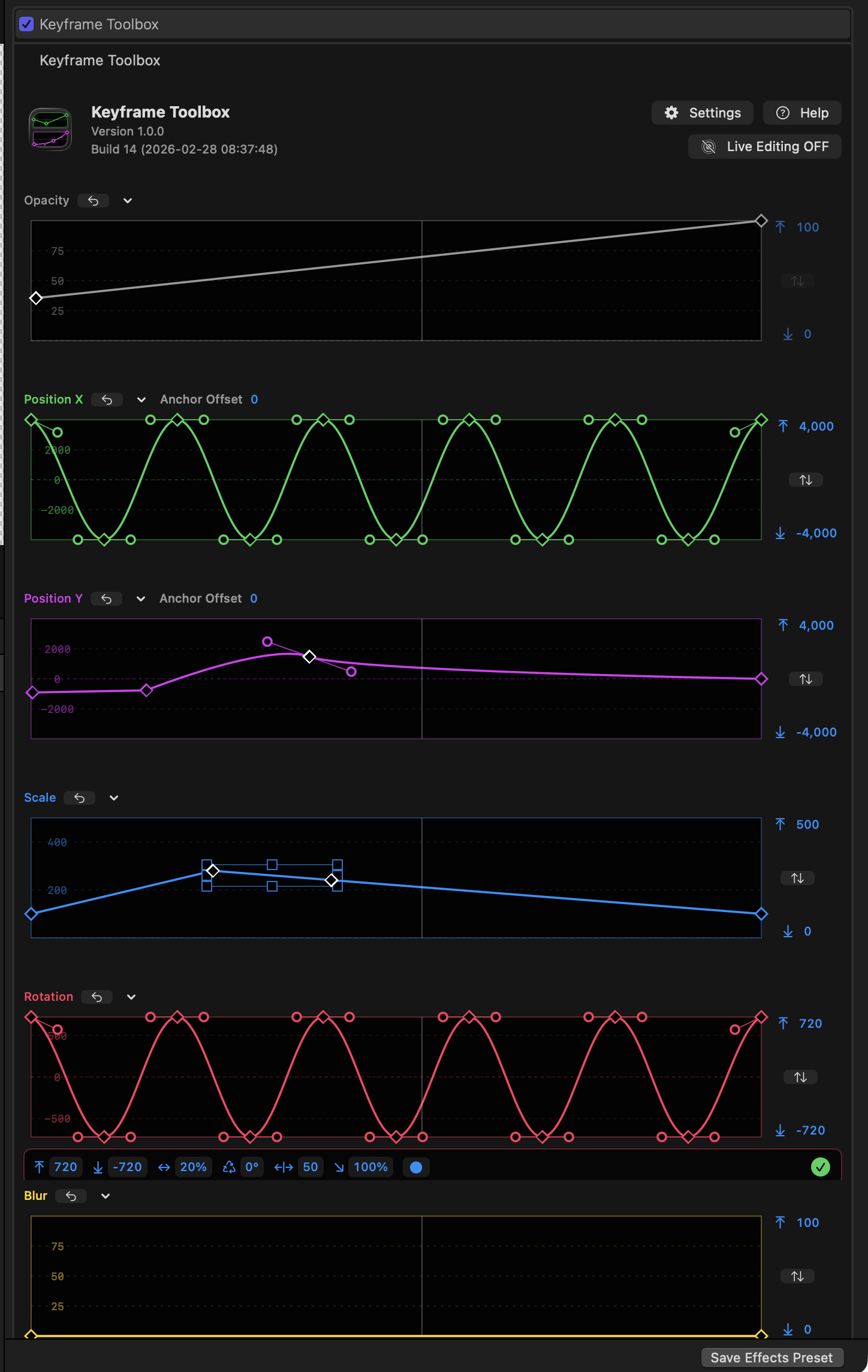
Whilst Final Cut Pro has some basic keyframe controls for Opacity, Position, Scale, Rotation, it includes only limited control over how keyframes transition into one another. In many contexts, only linear keyframes can be created, leading to clunky animations.
Though the classic Final Cut Pro included basic keyframe graphs, no version of the modern Final Cut Pro has ever offered a complete set of integrated keyframe controls.
It's time.
Built directly into the Final Cut Pro Inspector, Keyframe Toolbox gives you complete control of your keyframes so you can really refine your movements, rotations, scales, fades and virtual focus pulls.
This is a power-user’s tool to help editors and animators create complex, precise animations on the Final Cut Pro timeline.
Keyframe Toolbox takes all the very best keyframe controls from Apple Motion (color, repeating animation patterns), Adobe After Effects (scalable keyframe groups), Blender (precise value editing) and more.
We've made our graphs as easy to edit as curves in Adobe Illustrator, and included flexible oscillations and other common patterns to make it easy to create and then tweak many kinds of animations.
Keyframe Toolbox is a one-time purchase, not a subscription, and we hope you love it.
You can learn more on the Keyframe Toolbox website.
If you need help, the please place to go is the FCP Cafe Discord.
Please share the news far and wide - we've love everyone to test out Keyframe Toolbox!
Unfortunately we're still waiting on Apple's App Review to release VFX Toolbox and Notion Toolbox.
However, you can still access them via TestFlight in the meantime. Stay tuned!
FCP Template Manager v1.6 is out now.
It now supports Final Cut Pro Creator Studio v12 (subscription) and the Final Cut Pro v11 Free Trial.
It also includes various bug fixes and user interface improvements.
You can learn more on the FCP Template Manager website.
Keyframeless v2026-03-27 is out now for free on GitHub.
It contains:
- See where your captions will be broken apart, and add manual breaks.
- Added Intel Support.
- Added support for macOS 15 Sequoia.
- Fixed: Have to reboot Final Cut Pro after download template for it to become usable
- Fixed: Behaviours not mapping correctly to FCPXML
- Fixed: Downloaded templates not exposing styling
- Fixed: Freezing and no audio waveforms
- Fixed: Rounded crash on launch
You can download and learn more on GitHub.
Colourlab AI has some big announcements ahead...
We know it’s been quiet. - That wasn’t by accident.
While things may have looked calm on the surface, behind the scenes we’ve been rebuilding Colourlab from the ground up. The last six months have been some of the most intense R&D we’ve ever done — including bringing real-time 4K AI colour grading to mobile through our partnership with ARRI and HONOR.
That wasn’t the end goal. That was the foundation. Now comes the part that matters to you.
At NAB, we will introduce Colourlab AI v4. Not an update. Not a patch. A complete rewrite.
And this time, we didn’t just focus on new features — we focused on fixing what was broken.
Playback issues. Linking problems. Licensing confusion. Trials that didn’t work the way they should. Subscriptions that felt messy. We heard you — clearly — and we’ve rebuilt the system to remove that friction entirely.
If you’ve been frustrated with us in the past, you had a reason. And we’ve done something about it.
Version 4 introduces a new way of working — what we call agentic AI workflows — where the system starts to understand intent, not just execute commands. It’s faster, cleaner, and far more aligned with how you actually want to work.
We’re also rethinking training from the ground up, because powerful tools only matter if you can truly use them.
On April 10, we’ll show you the first glimpse of what’s coming ahead of NAB. If you’ve been waiting for us to get this right — this is where it starts.
You can register for the Live Stream on 10th April to learn more.
Marker to Reminder v1.5 is out now.
It includes the following change:
- Added user-requested marker filtering based on marker text, available as in-app purchase.
You can download and learn more on the Mac App Store.
Curves v1.1.1 is out now.
It includes the following changes:
- Add projection mode parameter: Select either object or world projection to configure how your 3D rotations are rendered
- If you have an older version of Curves installed:
- Update the Curves app from the App Store
- Open the Curves app and click Upgrade Effect
- Restart Final Cut Pro
You can download and learn more on the Mac App Store
Backups for Final Cut Pro v2.1.6 is out now.
It includes the following changes:
- Verified to work with Final Cut Pro v12.0.
- Sterner warring if you try to just restore a Project or Event instead of a whole library.
You can download and learn more on the Mac App Store