2026
January
14th January 2026
Happy New Year! Hope you all had a fun and relaxing holiday break!
2025 proved to be a bit of a rollercoaster for pretty much everyone I know (especially in the Film & TV world) - so fingers and toes crossed 2026 can be a bit more behaved!
Keeping FCP Cafe up-to-date the last few months has proven to be tricky, however, I hope to be a bit more active this year if I can.
The big news today is that Apple has announced Apple Creator Studio, which launches 28th January.
You can read the official Apple Press Release in their newsroom.
Interestingly, this news didn't make it to the front page of the Apple site - clearly the wider Apple doesn't think this is big enough news to go mainstream, which is interesting.
The initial launch of Apple Creator Studio includes:
- Final Cut Pro for Mac 12.0
- Final Cut Pro for iPad 3.0
- Logic Pro for Mac 12.0
- Logic Pro for iPad 3.0
- Pixelmator Pro for Mac 4.0
- Pixelmator Pro for iPad 4.0
- Motion 6.0 (Mac)
- Compressor 5.0 (Mac)
- MainStage 4.0 (Mac)
- Pages 15.1 (Mac, iPad, and iPhone)
- Numbers 15.1 (Mac, iPad, and iPhone)
- Keynote 15.1 (Mac, iPad, and iPhone)
You can watch the slick trailer on YouTube:
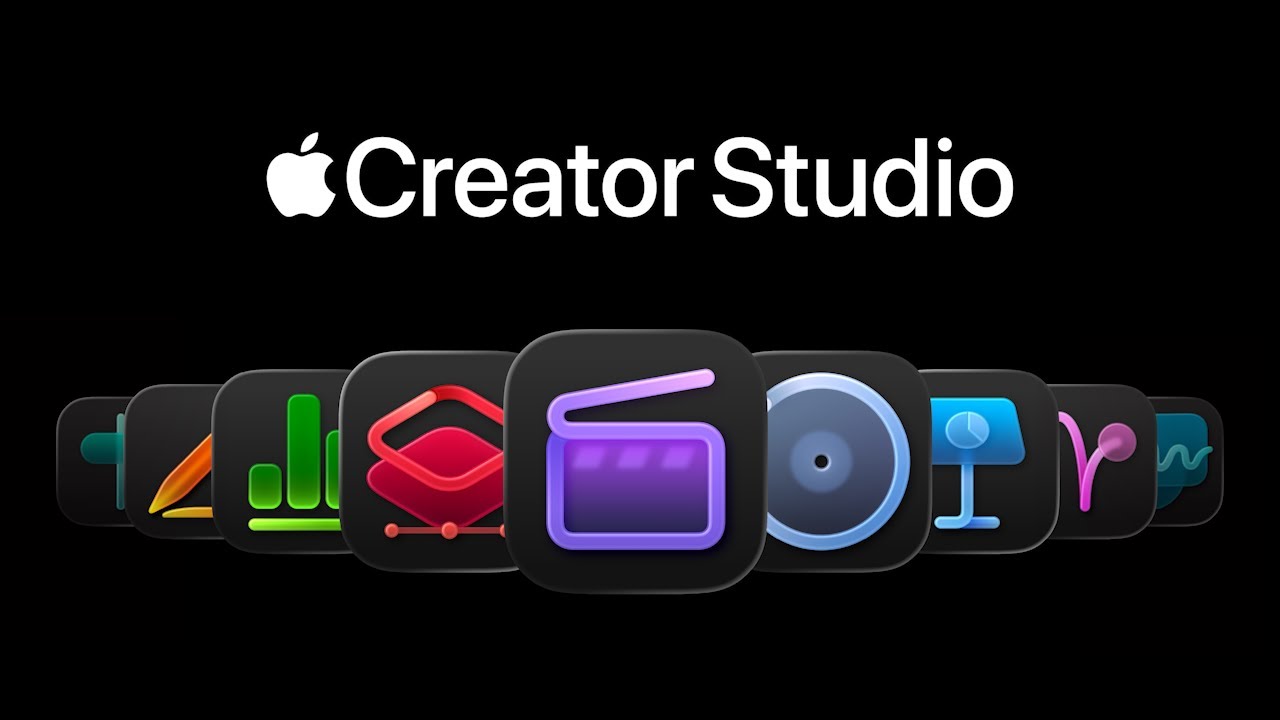
It would be AMAZING if the above trailer was actually created in Final Cut Pro and Motion - but the fact they don't mention it was, makes me think it sadly wasn't.
In a perfect world, Apple would be creating all these kinds of slick animations in Apple Motion, and showcasing how they're built - but alas, not this time at least.
For those that aren't already up-to-speed:
Apple Creator Studio gives subscribers access to a suite of creative apps designed for video, music, and image editing and creation. You can make videos in Final Cut Pro, Motion, and Compressor, produce music in Logic Pro and MainStage, and edit photos or graphics in Pixelmator Pro. And while Keynote, Pages, Numbers, and Freeform remain free for everyone, an Apple Creator Studio subscription offers premium templates, a library of high-quality, royalty-free photos and graphics, and powerful intelligence features.
Iain Anderson has written up a great little summary up on ProVideo Coalition.
Matthew O'Brien has already posted a new video on his YouTube discussing Creator Studio.
Apple Creator Studio will be subscription - however, the existing lifetime/perpetual versions of the app's will still be alive - i.e. the Final Cut Pro 11.2 you have today will continue to be updated.
A one-time purchase will still be available, but access to some of the premium content is available only to Apple Creator Studio subscribers. If you already own Final Cut Pro, it will continue to be updated.
My GUESS is that the "premium content" will be music, sound effects, motion graphics - basically the kind of thing you currently can find in Final Cut Pro for iPad - which doesn't exist on the Mac version.
Final Cut Pro is included in your subscription to Apple Creator Studio, which also includes Logic Pro, Pixelmator Pro, Motion, Compressor, and MainStage. In addition, Apple Creator Studio comes with enhanced versions of Keynote, Pages, Numbers, and Freeform that include premium templates, a library of high-quality, royalty-free photos and graphics, and powerful intelligence features.
You can try Apple Creator Studio free for 30 days. After your free trial, new subscribers pay $12.99 per month or $129 per year. Educator and student subscriptions are $2.99 per month or $29.99 per year. Final Cut Pro is also available as a one-time purchase for $299.99.
The cheaper educator and student subscriptions is quite a big deal - USD$2.99/month and USD$29.99/year is CRAZY cheap for what you get. I can imagine lots of universities and film schools around the world being very excited by this.
It will be super interesting to see how this works, and if this means Apple will be making policy changes to the App Store to enable this, because as far as I know, there's currently no mechanism in the App Store to do this specific educational pricing - at least not for third party developers like myself.
Also interesting is that:
...with the purchase of a new Mac or qualifying iPad, customers can receive three months of Apple Creator Studio for free
It's also worth noting:
Apple Creator Studio is available to download on the App Store as a universal purchase.
...meaning that if you purchase on iPad, it will work on Mac, etc. and:
Up to six family members can share all of the apps and content included in Apple Creator Studio with Family Sharing.
...which means you can buy once, and the whole family can use it - which is pretty awesome.
The other current unknown is how exactly the "legacy" version and the new version will ship.
My GUESS is that the current "legacy" version of Final Cut Pro will continue to ship "as-is" with it's existing bundle identifier (i.e. com.apple.FinalCut on Mac), and they'll use the Final Cut Pro for iPad bundle identifier (i.e. com.apple.FinalCutApp) for the Creator Studio version of the Mac App - so that existing users can continue to work away and update Final Cut Pro as they normally would.
However, less is clear about how exactly the Apple Creator Studio will appear in the App Store.
It's possible that Apple Creator Studio might just appear as a single application - and Apple does some trickery (that third parties aren't allowed to do currently due to sandbox requirements) that installs the other applications.
Or it's possible that Apple might just treat it as an App Bundle, and add some kind of mechanism to support subscriptions in App Bundles (which I don't believe is currently possible?).
If I had to make a prediction, maybe the reason Apple just announced the Apple Creator Studio today, rather than ship it, is because they need to make some changes to the App Store policy, and they didn't want to do that first, as the rumour mill would pick up on what's in-store. I wouldn't be surprised if we see some App Store policy changes in the coming weeks. We'll see.
So what's new in Final Cut Pro?
Video Creation Gets Smarter and Faster
Final Cut Pro for Mac and iPad empowers content creators, video editors, and filmmakers to elevate their projects with intuitive features. One-time-purchase Mac users and Apple Creator Studio subscribers can experience blazing-fast performance with Apple silicon for the most demanding workflows, and get into the creative flow faster than ever with new on-device intelligent features that make video creation effortless and easy.
For better or for worse, the wider Apple seems to have very much stopped using the term "machine learning" and is now pushing "AI" as much as they can. Apple Creator Studio really seems to be a way to help convince Apple Shareholders that they're still in the AI game.
First up, we have Transcript & Visual Search on Mac and iPad.
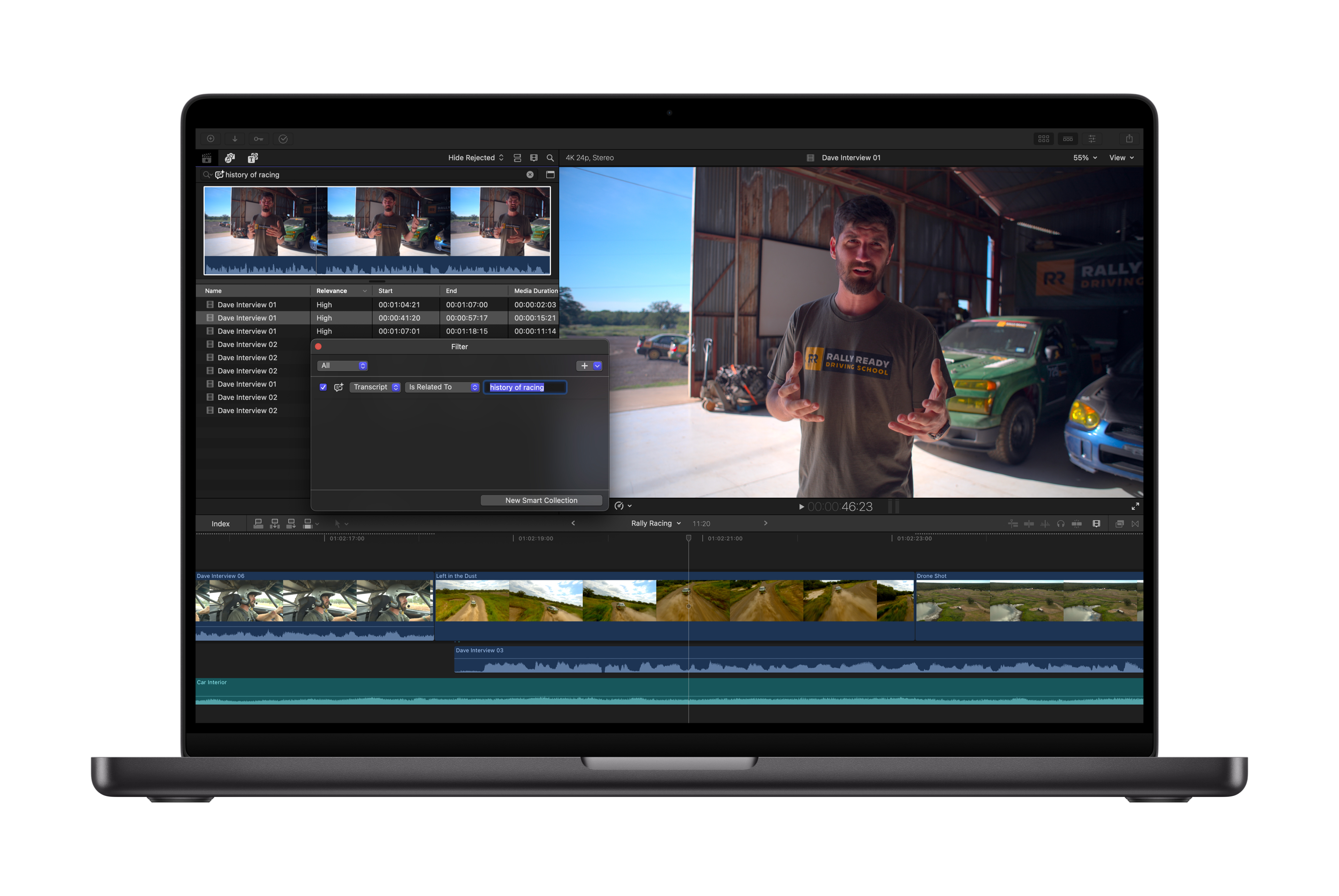
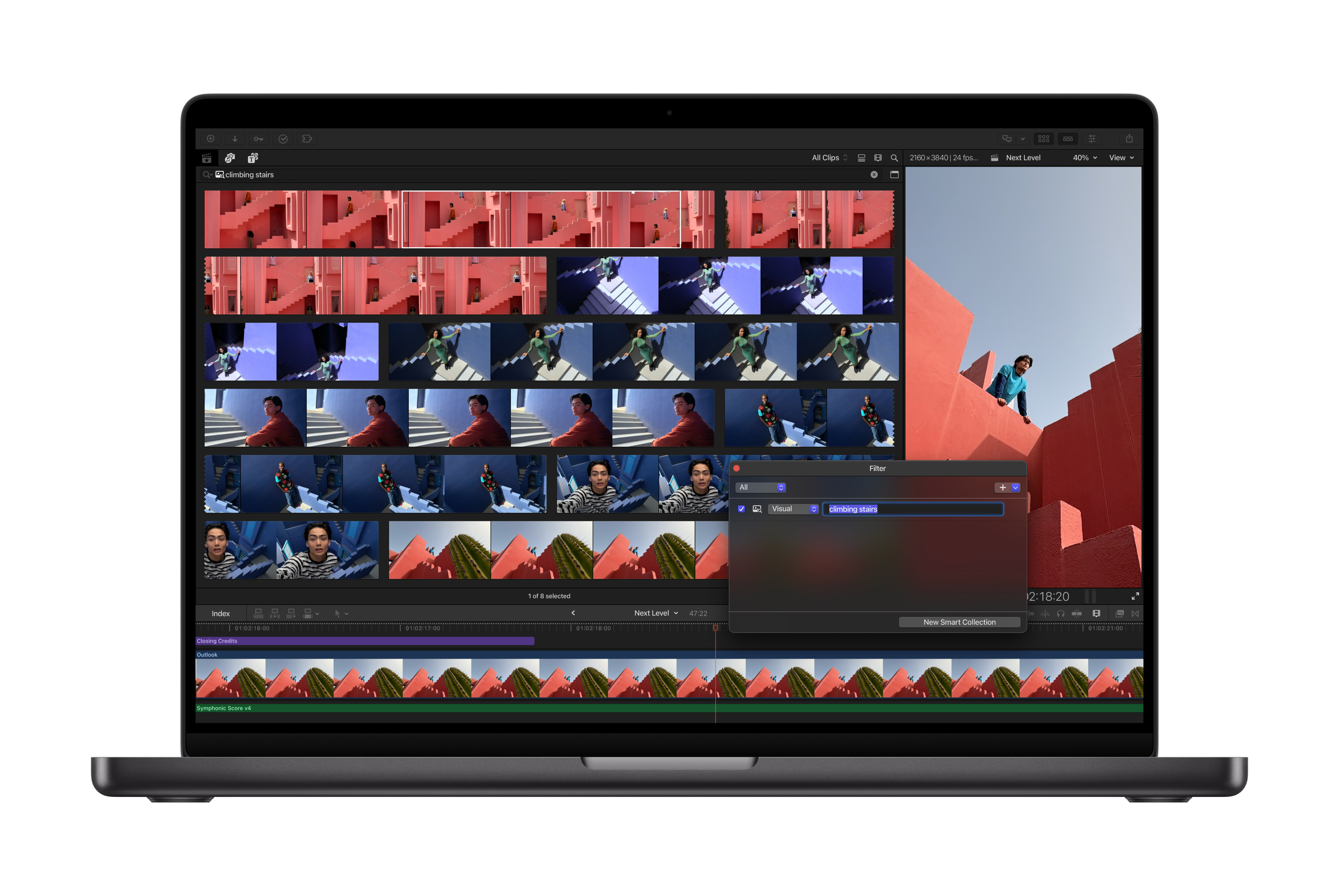
With Transcript Search on Mac and iPad, users can now easily find the perfect soundbite in hours of footage by simply typing phrases into the search bar to see exact or related results. Video podcasts and interviews can be assembled quickly, eliminating extensive time spent skimming through footage. Looking for a specific video clip also gets an intelligence assist with Visual Search. Now, users can quickly pinpoint exact moments across all footage by searching for an object or action, and then add that visual to their timeline in seconds.
Transcript Search in Final Cut Pro requires a Mac with Apple silicon and macOS 15.6 or later, or an iPad with the Apple M1 chip or later, iPad (A16), or iPad mini (A17 Pro) and iPadOS 26 or later. Available only in U.S. English.
Visual Search requires a Mac with Apple silicon and macOS 15.6 or later, or an iPad with the Apple M1 chip or later, iPad (A16), or iPad mini (A17 Pro) and iPadOS 26 or later. Available only in U.S. English.
Essentially... this is bringing Jumper natively to Final Cut Pro.
With Transcript Search, you'll be able to search through all your dialogue in your Library and find specific words and phrases by entering a description using natural language - i.e. in the example below, they're searching all the transcripts that have ranges that are related to the history of racing (as opposed to finding the words "history of racing"). You'll also obviously be able to search for exact words/phrases too.
You'll be able to make Smart Collections with these search criteria, so as you ingest more footage, the Smart Collections will be populated with more stuff.
You'll also be able to filter by Relevance.
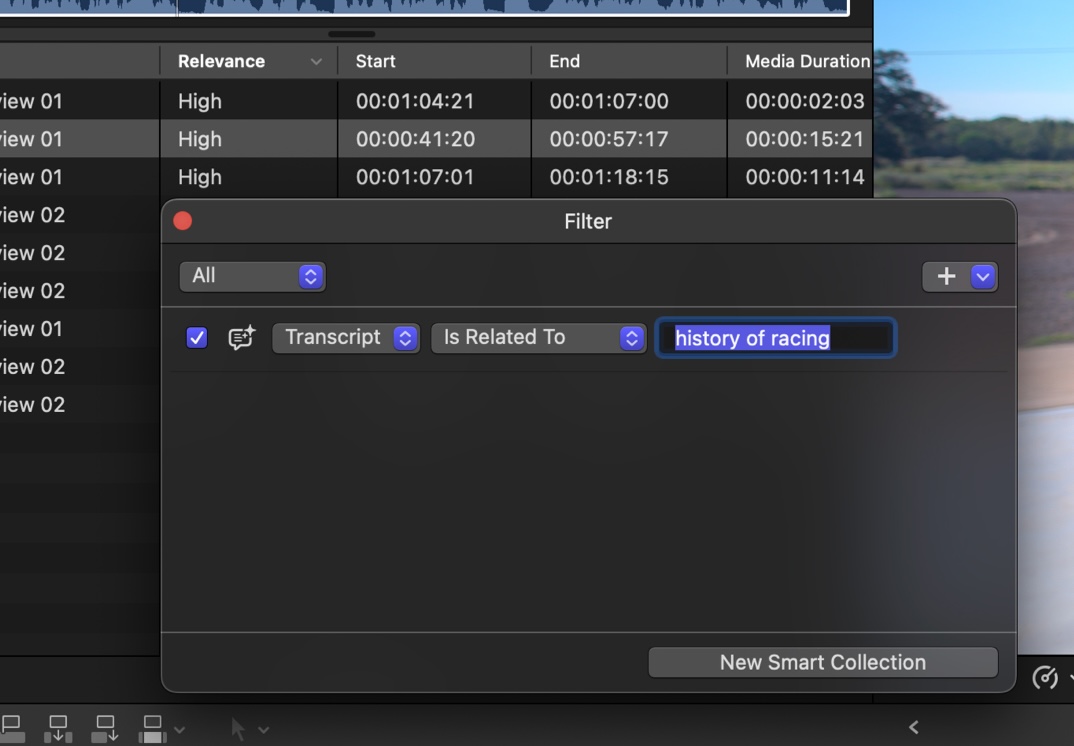
In this first release, this will only work in U.S. English - but I'm sure it will come to other languages over time.
Visual Search will be much the same - you'll be able to use natural language to search for actions (i.e. "climbing stairs") and objects (i.e. "red ball").
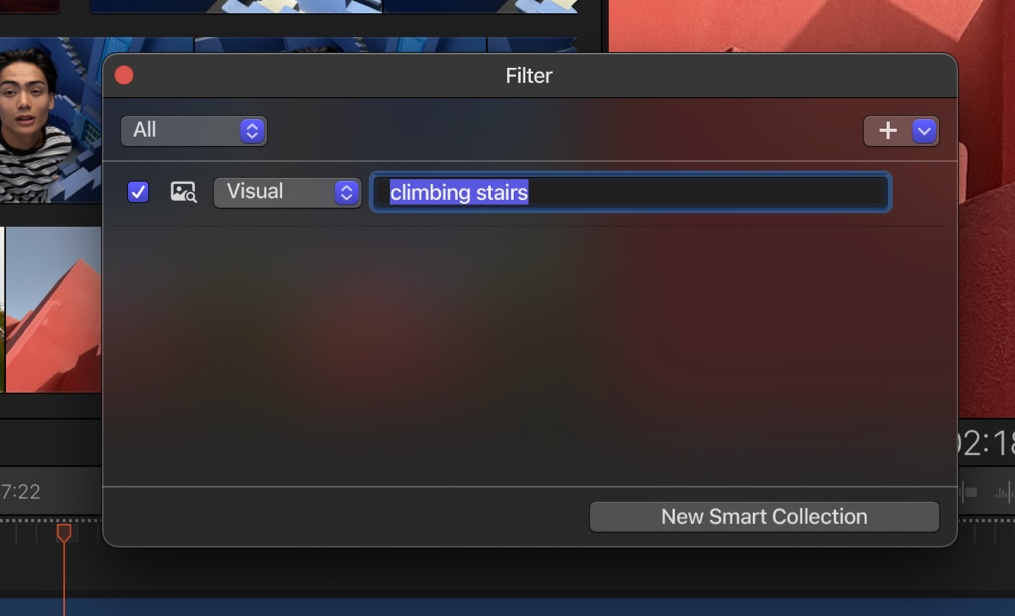
We would ASSUME that both Transcript & Visual Search will be on by default in the Import Settings.
As someone who directly helped bring Jumper to Final Cut Pro, it'll be super interesting to compare Jumper and Apple's offering in terms of speed, quality and ease-of-use.
I'm ASSUMING that Apple's machine learning models will be super fast - especially as they're supporting all Apple Silicon devices.
The quality - who knows until it ships. We do know that lots of people are using Jumper in Adobe Premiere, even though Media Intelligence is built in natively, simply because Jumper's search results are better - i.e. Jumper understands what a Millennium Falcon is.
My GUESS is that Apple will have to tread very carefully with their machine learning models - and like with Adobe, Apple's models also won't know what a Millennium Falcon is (for example).
Personally, I think Apple's Transcript & Visual Search will work awesome for most users. It'll be fast, native, and super handy.
Even today, when it comes to searching transcriptions, I sometimes find it faster and easier to just throw all my footage into a timeline, generate captions and search the Timeline Index to find specific things - as opposed to firing up Jumper.
However Jumper's advantage is that the same analysis files can be shared between Mac & PC, and between Final Cut Pro, DaVinci Resolve, Adobe Premiere Pro and Avid Media Composer. It also works in multiple languages - which Final Cut Pro won't do on launch.
Next up, we have something that I'm SUPER excited about... Beat Detection.
Final Cut Pro for Mac and iPad also makes editing video to the rhythm of music fast and fun with Beat Detection, an amazing new way to see musical beats, bars, and song parts right in the project timeline. Beat Detection uses an AI model from Logic Pro to instantly analyze any music track and display the Beat Grid, so users creating fast-paced videos can quickly and visually align their cuts to the music. Re-editing music tracks to different lengths is also easier than ever.
At the previous Final Cut Pro Creative Summit, the Final Cut Pro team told us that they were basically "sharing a wall" with the Logic Pro team - so it's awesome to FINALLY see a truly great collaboration between the teams!
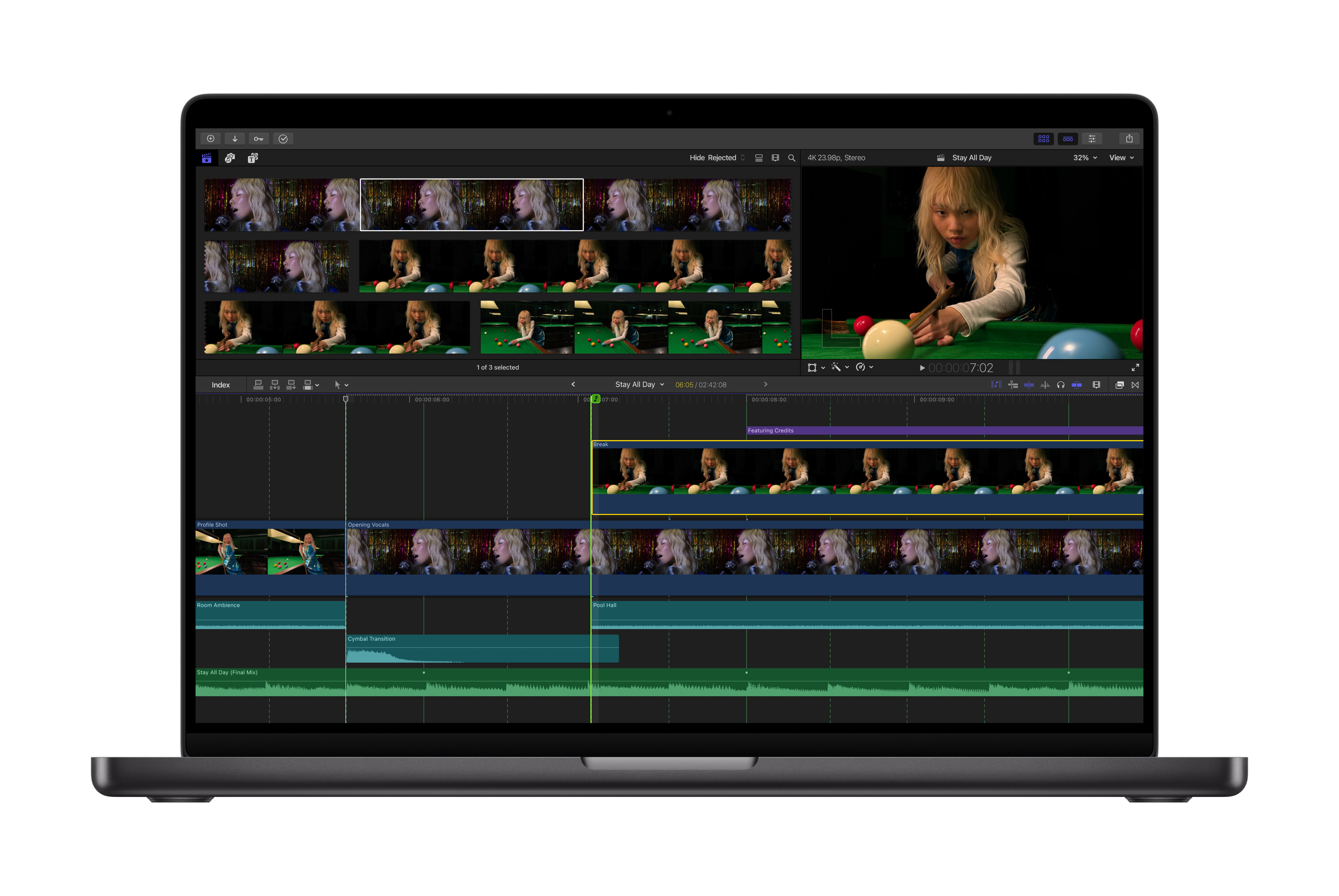
Even though 3rd party tools like the awesome BeatMark Pro exist - personally, I still spend a lot of time manually adding markers to music tracks - so I think this will be a massive time saver.
The fact it uses a beat grid, rather than markers, is a really nice design. It looks like you'll be able to toggle it from both the toolbar and shortcut keys, so it'll be super handy.
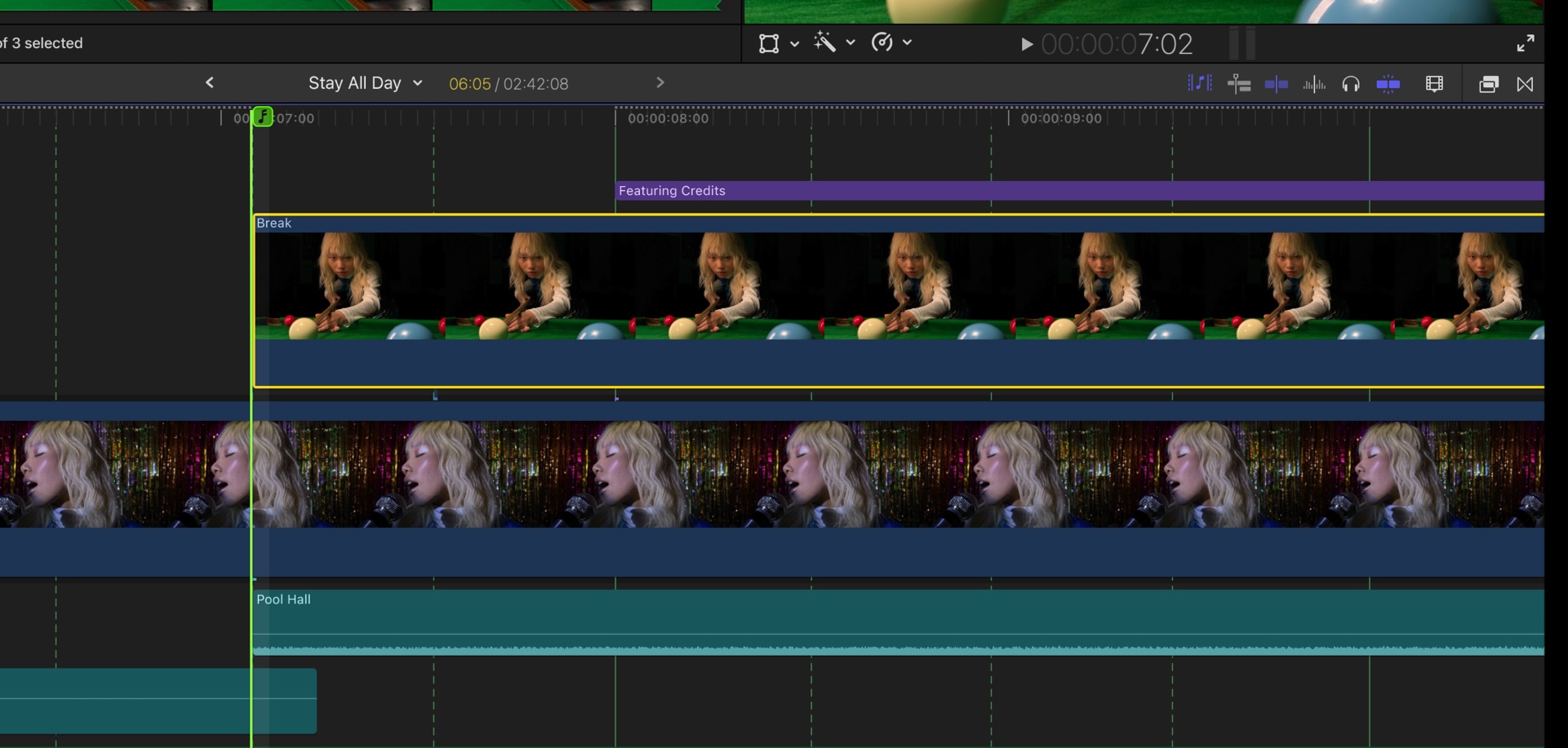
Weirdly, Apple continues to add features to iPad that haven't made it to the Mac, such as the new Montage Maker.
The new Montage Maker in Final Cut Pro for iPad lets users kick-start their edit in just seconds. Using the power of AI, Montage Maker will analyze and edit together a dynamic video based on the best visual moments within the footage, with the ability to change the pacing, cut to a music track, and intelligently reframe horizontal videos to vertical with Auto Crop to simplify sharing across social platforms.
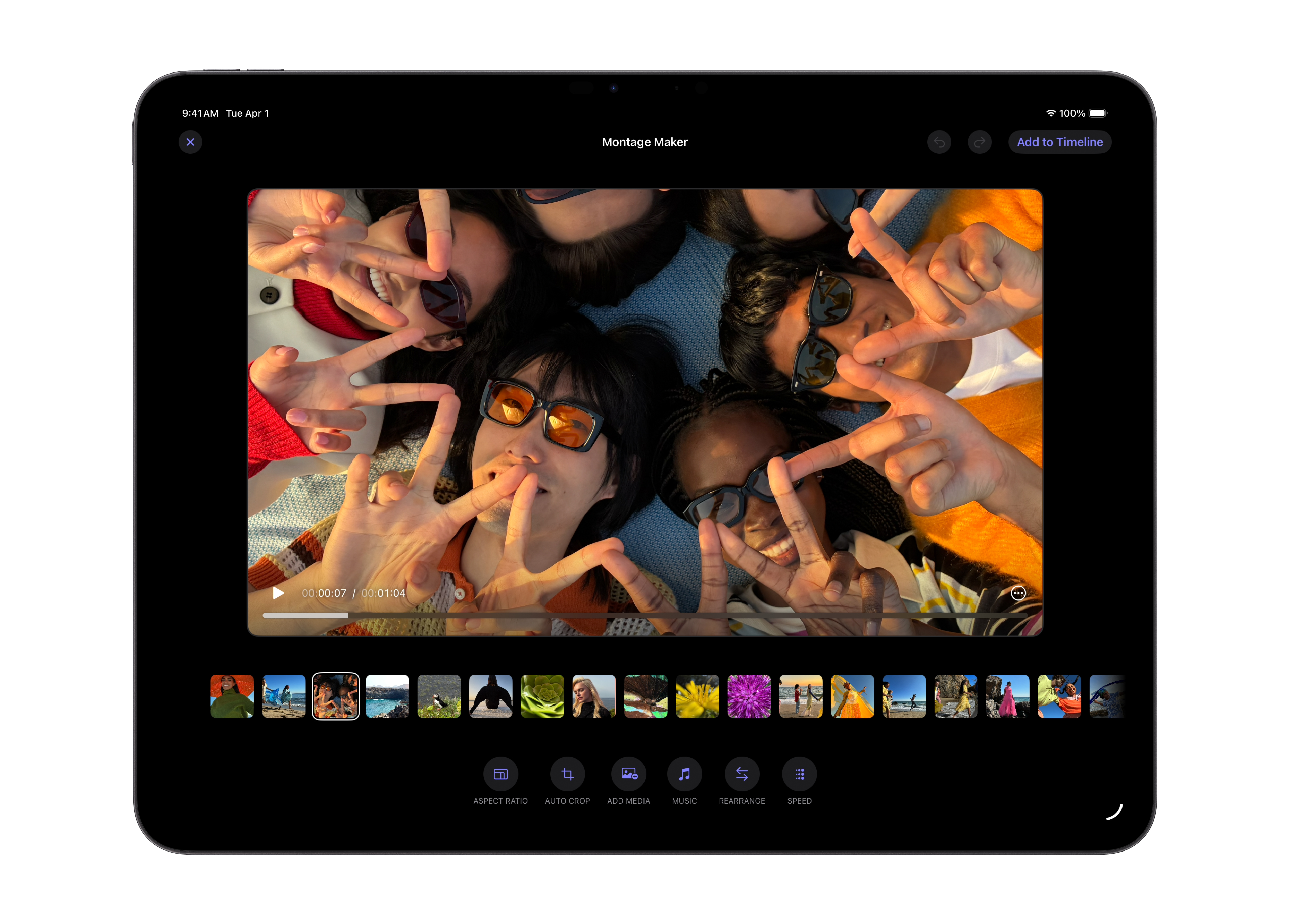
I'm going to ASSUME this is basically use the same technology/frameworks as Apple Photos.
It'll be super interesting to see how these montages translate from iPad back to Mac.
Not very exciting, but handy for new users, it looks like there's also a new toolbar button for creating Libraries, Events & Projects:
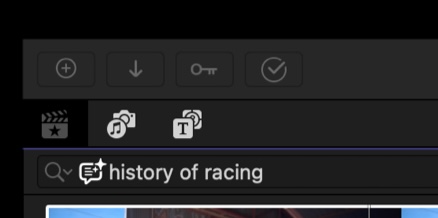
And that basically concludes all the new Final Cut Pro features.
We'll definitely see some bug fixes and general improvements.
To quote my previous blog post:
One major bug that's been in Final Cut Pro for a while, but is a major pain, is if you have UltraHD (3840x2160) footage in a HD (1920x1080) timeline, it doesn't actually fill the entire frame - there's a 1 pixel boundary at the edges.
If you have your Viewer background set to Black then this is very hard to notice - you really only notice it if your Viewer background is transparent, or if you have something colourful underneath the UltraHD footage.
Whilst this is annoying for every Final Cut Pro user working with UltraHD footage in a HD timeline - this is a major pain for anyone working in broadcast, as it will fail QC.
I know that Apple is aware of this bug - so I'm HOPEFUL that we'll see a fix sooner rather than later.
There's a lot of other bugs on the FCP Cafe Bug Tracker - but I feel like this one is really a priority.
We'll definitely see FCPXML v1.14. We'll also definitely see a (hopefully big) update to FxPlug. Hopefully we'll also see an update to Workflow Extensions.
It's VERY unlikely, but one day we might also eventually see a Control Surface SDK - so that control surface manufactures can interact directly with Final Cut Pro without CommandPost.
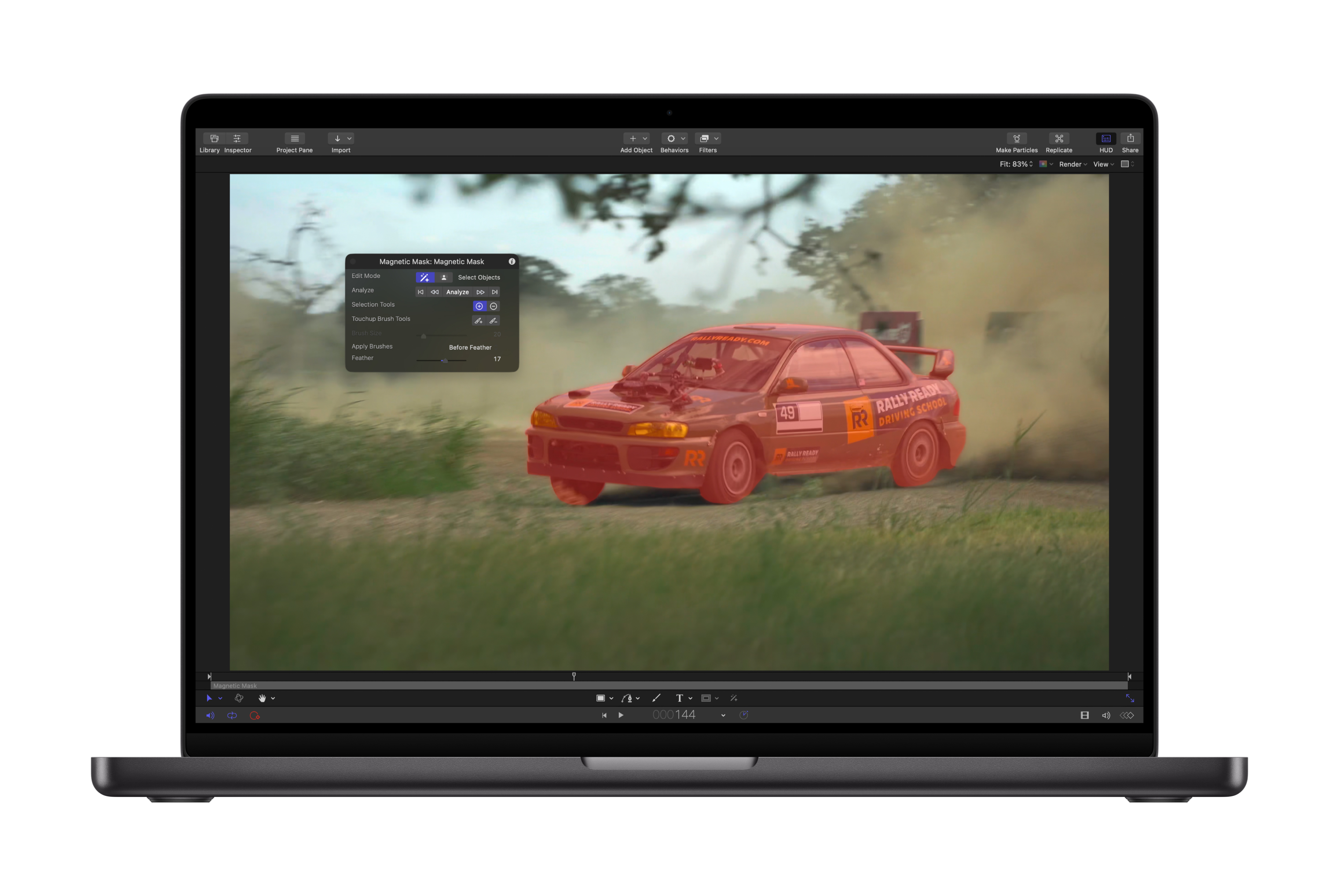
In other news... The Magnetic Mask finally comes to Apple Motion on Mac.
The powerful and intuitive Magnetic Mask comes to Motion, allowing users to isolate people and objects in their footage to customize backgrounds and environments without a green screen.
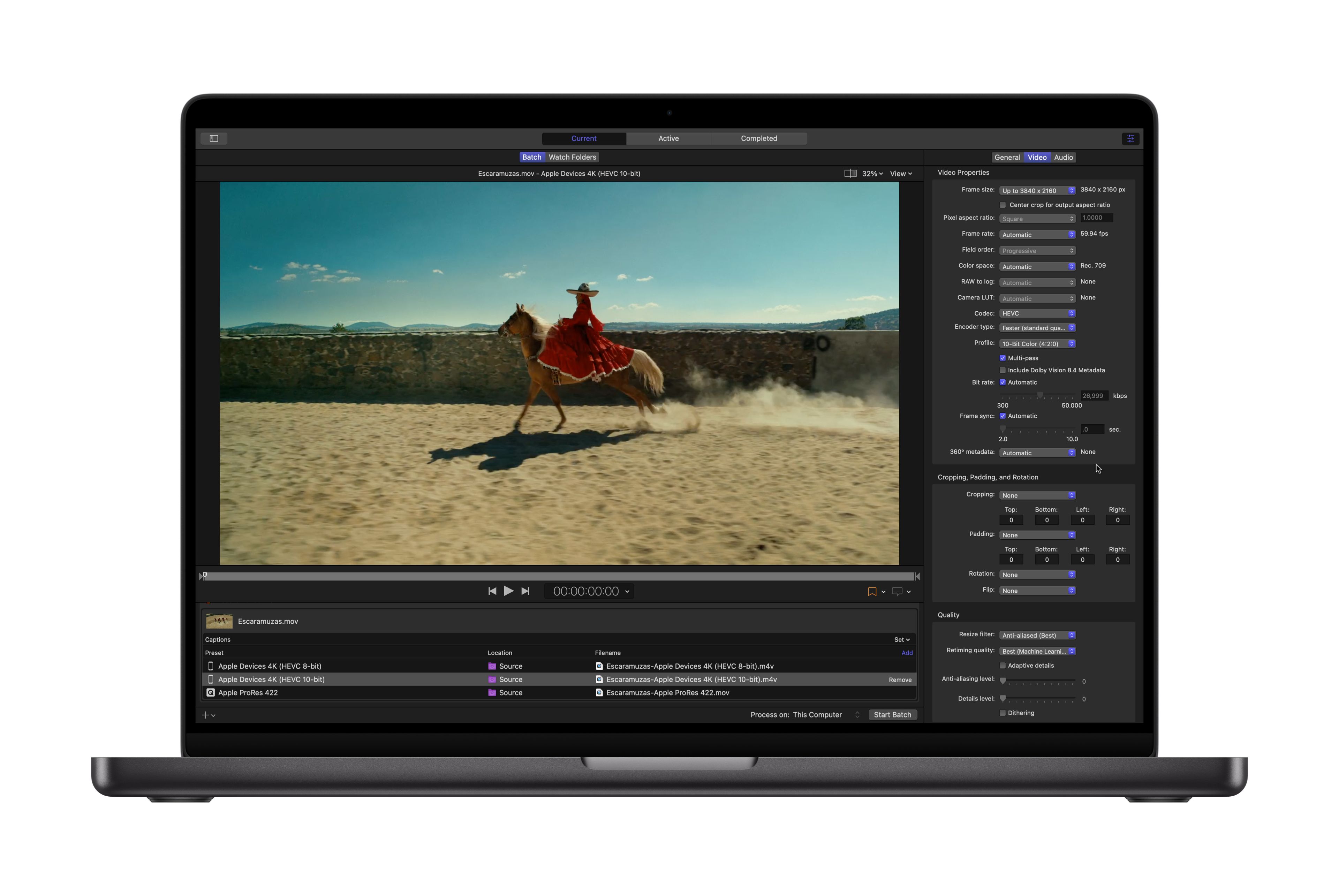
At the Create immersive media experiences for visionOS event Apple announced that Compressor will be able to export Apple Immersive Video packages - so we'll most likely see that ship too.
Apple Creator Studio subscribers also have full access to Compressor to customize output settings, and Motion for creating 2D and 3D effects.
For those that haven't been following along, FMC recently posted:
While we’re finalizing our plans for 2026, we’ve got something new we’re excited to share now: Apple is partnering with FMC on an exclusive Final Cut Pro track at Post|Production World during NAB.
The top experts in the industry will be leading sessions packed with advanced techniques, workflow breakthroughs, and insider knowledge that’ll change how you work with Apple pro apps.
See you in April.
Given this, I think that the Final Cut Pro track at Post|Production World during NAB will mostly be focussing on this new update - i.e. Transcript & Visual Search.
My GUESS is that they'll either cancel the FCP Creative Summit all together (probably in favour of a smaller, but more mainstream one day "Creator Studio" even at the Apple Developer Centre) - or postpone it until later in the year (similar timing to what they normally do).
I think we'll hear much more about Apple Creator Studio at WWDC this year - they'll use it to announce more AI features.
Apple's predicted to release a HEAP of hardware this year too - so we'll most likely continue to hear about Apple Creator Studio with each hardware update as well.
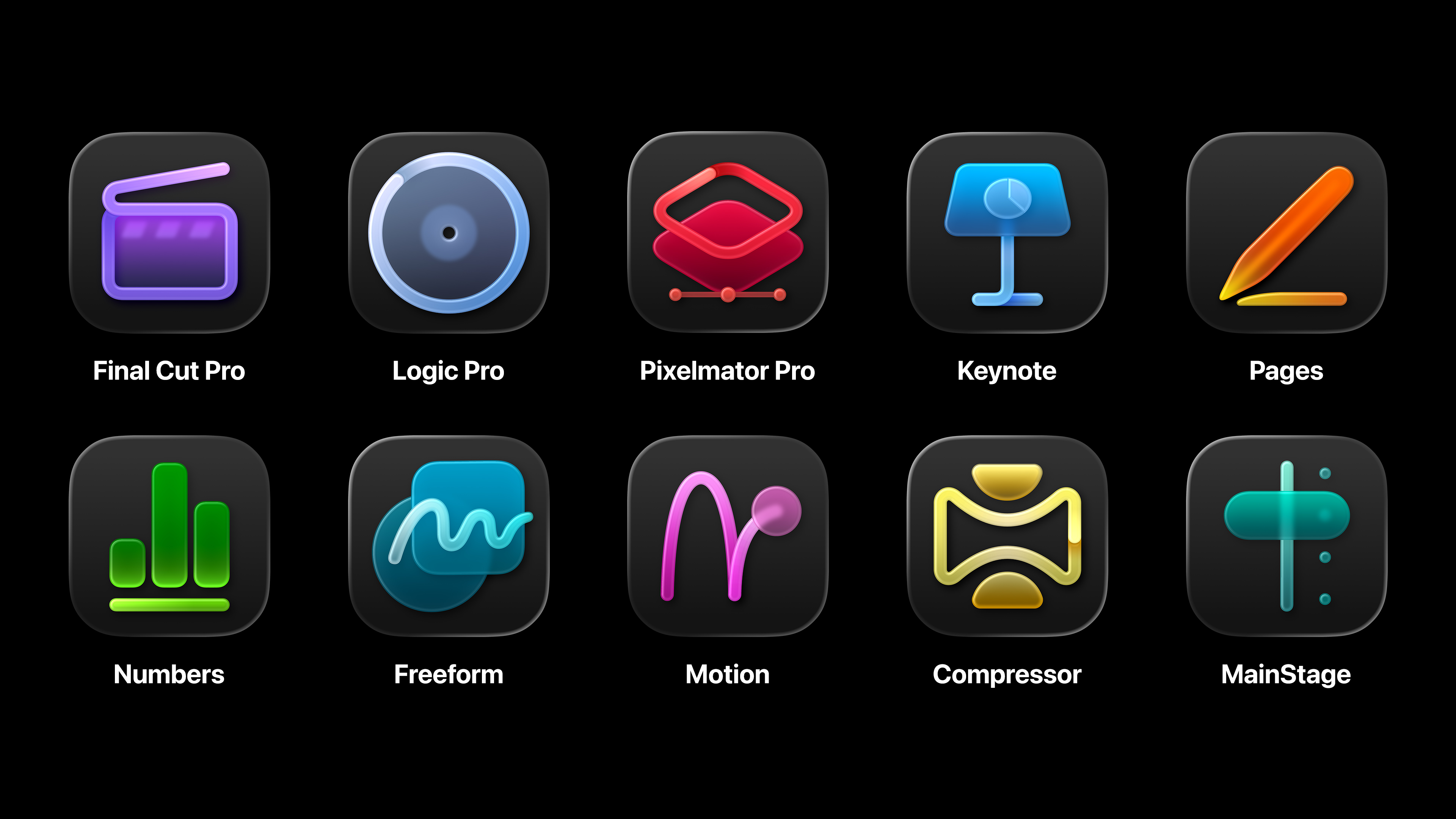
Before I wrap things up, we have to talk about these:
Interestingly...
Final Cut Pro, Motion, Compressor, Logic Pro, MainStage, and Pixelmator Pro are also available as one-time purchases for Mac on the App Store. If you previously purchased one of these apps and you also have an Apple Creator Studio subscription, you can use either version of the apps. You can have both versions of these apps installed on your Mac. To make it easier to distinguish versions, the apps in Apple Creator Studio have unique icons.
Personally, I really HATE the direction Apple has gone with their Mac icon designs. I really LOVE traditional Mac icons.
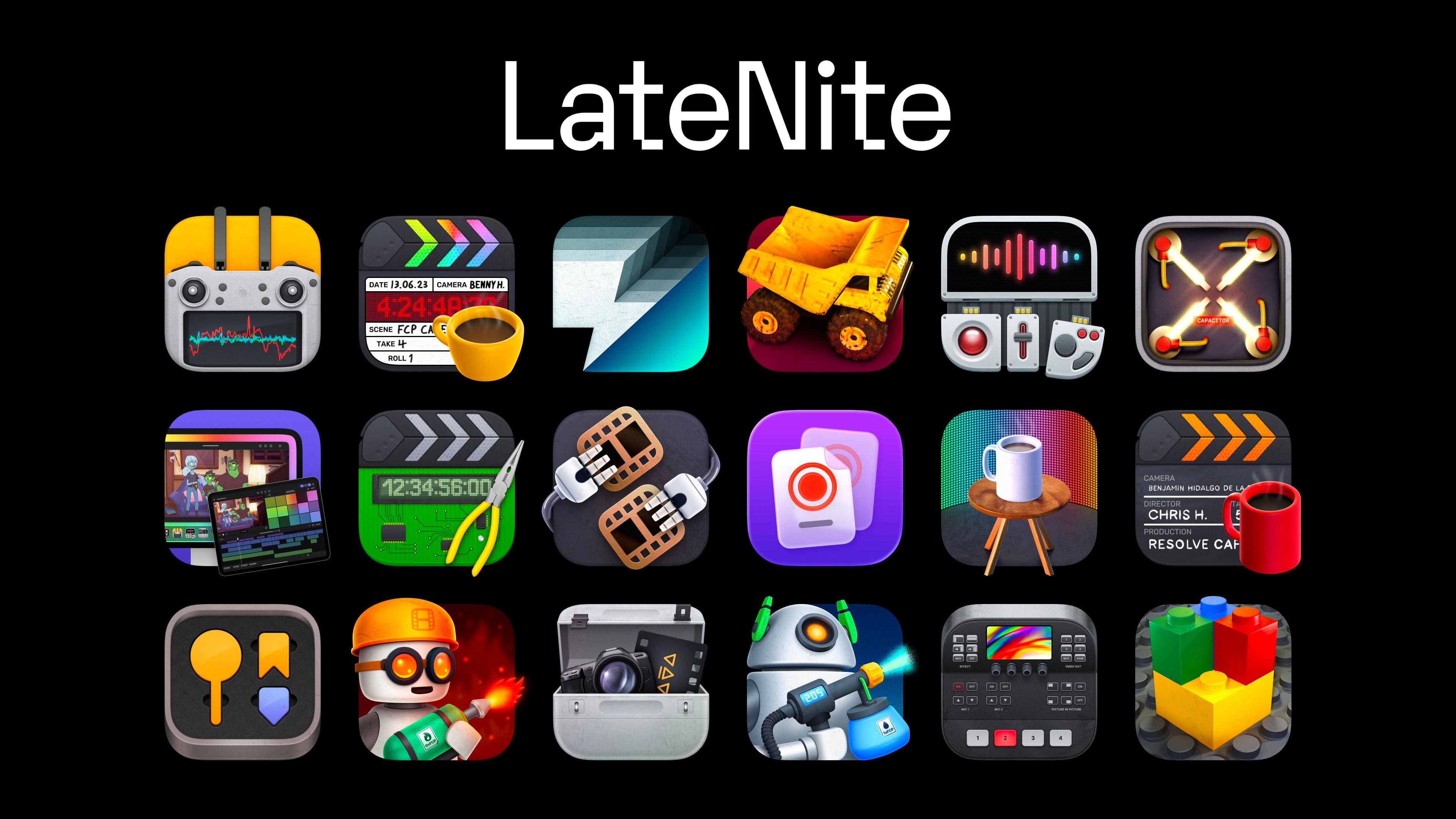
I really LOVE all my app icons, designed by the insanely talented Matthew Skiles.
I'm still currently running macOS Sequoia for the simple reason that people constantly send me screenshots of all the visual atrocities that are occurring in macOS Tahoe.
So my sincerest apologies to all the hundreds of CommandPost users who email me daily about CommandPost's Timeline Batch Export not working in Tahoe - I haven't fixed it for the simple reason, that I just don't want to upgrade any of our machines to Tahoe because it's so ugly. I promise I'll get to it eventually.
Overall, I think this Final Cut Pro update is a great one - I'll use Transcript Search, Visual Search, and Beat Detection almost daily.
Because I maintain Transfer Toolbox (allowing you to get from Final Cut Pro on iPad to Mac), I'll basically have to subscribe to Apple Creator Studio to keep using the iPad version.
So now that we know what the next Final Cut Pro looks like - what's next?
Well, we still haven't gotten a Final Cut Pro for iPad update with 3rd Party Motion Templates (it's been "coming soon" for years now).
MacRumors reported:
Apple might be preparing iPad apps for Pixelmator Pro, Compressor, Motion, and MainStage, according to new App Store IDs uncovered by MacRumors contributor Aaron Perris. All four of the apps are currently available on the Mac only.
...so my GUESS is that at some point this year we'll see Compressor and Motion for iPad, and we'll finally see 3rd party Motion Templates for Final Cut Pro on iPad.
Long term, I think Apple will try and move everyone across to an Apple Creator Studio subscription, by using collaboration as the draw card - seamless sharing between Mac & iPad. But I think this is probably 5 years away still.
The other interesting thing that's come up recently in Richard Taylor's YouTube Channel and on various Facebook groups is that fact that Blackmagic still hasn't shipped their Blackmagic RAW MediaExtension.
Apple announced that Blackmagic would be releasing a BRAW MediaExtension at last years FCP Creative Summit - but whilst nablet has released some MediaExtensions - we still haven't seen anything from Blackmagic.
As the creator of BRAW Toolbox, I'm obviously in touch with the BRAW team at Blackmagic quite a bit, and I know they've been working on the MediaExtension for a long time now - so it's curious that they still haven't shipped anything.
My GUESS is that there's some technical issue/limitation that's preventing Blackmagic from releasing it - i.e. maybe the MediaExtension performance is worse for BRAW than in Blackmagic DaVinci Resolve or using the official BRAW SDK - who knows.
However, for now - BRAW Toolbox still works awesome - and there's over 3.80K BRAW Toolbox users using it on all kinds of projects, from television shows, to feature films to music videos. I'm constantly blown away by some of the projects that people use BRAW Toolbox on.
Slightly old news now (4th January), but Gyroflow Toolbox v1.3.3 (Build 25) is out now on the Mac App Store!
It contains the following improvements:
- Gyroflow Toolbox can now handle video files greater than 8192 pixels (as long as your GPU supports it). Thanks for reporting mhbsavant!
- We've updated to the latest Gyroflow Core Renderer. HUGE thank you to the amazing AdrianEddy for all his ongoing help, assistance, genius and support!
- 28 lens profiles have been updated from the hero Gyroflow project. Thanks to EVERYONE who has submitted lens profiles and another HUGE thank you to AdrianEddy for all the work that goes into managing them.
We also missed the Gyroflow Toolbox v1.3.2 (Build 24) released on FCP Cafe (18th Nov) which contained:
🐞 Bug Fix:
- Fixed a bug where vertical (9x16) clips would not stabilise correctly in Final Cut Pro. If you now set the Input Rotation and Video Rotation to
90in Gyroflow Toolbox, things should now render correctly.
🔨 Improvements:
- We've updated to the latest Gyroflow Core Renderer. HUGE thank you to the amazing AdrianEddy for all his ongoing help, assistance, genius and support!
- 6 lens profiles have been updated from the hero Gyroflow project. Thanks to EVERYONE who has submitted lens profiles and another HUGE thank you to AdrianEddy for all the work that goes into managing them.
Jumper v2026.01.12 (Build 2740) is out now!
This release includes facial recognition support.
You can learn more on the Jumper website.
Marker to Reminder v1.1 by Automatic Duck is out now for FREE on the Mac App Store!
Convert your Final Cut Pro timeline markers into Apple Reminders instantly. Track editing tasks with timecodes, right from the app you already use.
You can learn more and download on the Mac App Store.
Simon Says Transcription v3.9.8 is out now with performance improvements and bug fixes.
You can learn more and download on the Mac App Store.
fontAudition-X v1.0.8 is out now with bug fixes.
You can learn more and download on the Mac App Store.
captionAnimator v1.1.5 is out now on the Mac App Store.
It includes:
- New app icon
- Bug fix to replace a deprecated call to open the new
fcpxmlfile - Bug fix for switching between multiple titles when shortening the captions
You can learn more and download on the Mac App Store.
Production Clip Reporter has just been announced!
Frame accurate Sequence Reporting: Track all Clips, Effects, Transitions, Clip and Sequence Markers.
Generate professional production reports from Avid Media Composer, Adobe Premiere or DaVinci Resolve via OpenTimelineIO.
You can learn more on the Intelligent Assistance website.