# FCPXML
This section of the site is dedicated to **FCPXML**.
FCPXML is insanely complicated and confusing. Because all its time units are in rational numbers, it also makes it hard to easily work things out without a spreadsheet, drawing or calculator.
Sadly, even ChatGPT gets confused by it.
The purpose of this page is to try and make FCPXML less scary with examples and breakdowns.
If you have questions about FCPXML, [please let us know](/contribute/) so that we can update this page accordingly.
---
## FCPXML Format Reference
You can read a detailed FCPXML Format Reference document over on the [FCPBridge GitHub](https://github.com/elliotttate/FCPBridge/blob/main/docs/FCPXML_FORMAT_REFERENCE.md).
---
## Frequently Asked Questions
### Why does FCPXML use Rational Numbers?
Final Cut Pro expresses time values as a rational number of seconds with a 64-bit numerator and a 32-bit denominator.
Frame rates for NTSC-compatible media, for example, use a frame duration of 1001/30000s (29.97 fps) or 1001/60000s (59.94 fps).
If a time value is equal to a whole number of seconds, Final Cut Pro may reduce the fraction into whole seconds (for example, 5s).
So... Why?
Because one of Apple's core frameworks/technologies, [Core Media](https://developer.apple.com/documentation/coremedia) also represents time as a rational value, with a time value as the numerator and timescale as the denominator.
The structure can represent a specific numeric time in the media timeline, and can also represent nonnumeric values like invalid and indefinite times or positive and negative infinity.
---
## Official Documentation
You can find the [official FCPXML documentation](https://developer.apple.com/documentation/professional_video_applications/fcpxml_reference?language=objc).
---
## Getting Started
You can read [Demystifying Final Cut Pro XMLs by Philip Hodgetts and Gregory Clarke](/developer-case-studies/fcpxml/) on FCP Cafe, which gives a fantastic introduction to FCPXML.
---
## swift-daw-file-tools
[Steffan Andrews](https://github.com/orchetect) has created an amazing Swift Framework called [swift-daw-file-tools](https://github.com/orchetect/swift-daw-file-tools), which can read and process FCPXML.
---
## SwiftSecuencia
SwiftSecuencia provides a type-safe, Swift-native API for creating and exporting media timelines. Build timelines programmatically and export to professional formats for Final Cut Pro, audio production, and more.
You can learn more about [SwiftSecuencia](https://github.com/intrusive-memory/SwiftSecuencia).
---
## Pipeline Neo (CLI & Library)
**Pipeline Neo** is modern Swift 6 framework for working with Final Cut Pro's FCPXML with full concurrency support and SwiftTimecode integration. Pipeline Neo is a spiritual successor to the original [Pipeline](https://github.com/reuelk/pipeline), modernised for Swift 6.0 and contemporary development practices.
Pipeline Neo provides a comprehensive API for parsing, creating, and manipulating FCPXML files with advanced timecode operations, async/await patterns, and robust error handling. Built with Swift 6.0 and targeting macOS 12+, it offers type-safe operations, comprehensive test coverage, and seamless integration with SwiftTimecode for professional video editing workflows.
Pipeline Neo's codebase is derived from [swift-daw-file-tools](https://github.com/orchetect/swift-daw-file-tools) and [SwiftSecuencia](https://github.com/intrusive-memory/SwiftSecuencia). The project now includes an experimental CLI tool for testing and expanding Pipeline Neo's functionality.
This codebase is developed using AI agents.
You can learn more about [Pipeline Neo](https://github.com/TheAcharya/pipeline-neo).
---
## Preferred XML Editor
I'm a massive fan of [BBEdit 14](https://www.barebones.com/products/bbedit/).
It has a 30 day free trial, and is also available on the Mac App Store.
---
## DTD Validation
macOS has a built in XML lint tool - allowing you to validate a `FCPXML` document against it's `DTD` file.
!!!primary What's a DTD?
A DTD (Document Type Definition) file is used in XML to define the structure and the legal elements and attributes of an XML document. It's a set of markup declarations that provide a rulebook for a specific type of XML document, describing what the document contains and how those elements and attributes are organised.
!!!
You can download all the [`FCPXML` `DTD` files](https://github.com/CommandPost/CommandPost/tree/develop/src/extensions/cp/apple/fcpxml/dtd).
You can then use this Terminal Command to validate things:
```
xmllint --dtdvalid "/path/to/FCPXMLv1_9.dtd" "/path/to/your/file.fcpxml"
```
!!!primary Tip!
You can just drag in a file from Finder into Terminal, and Terminal will write out the file's path.
Simply type `xmllint --dtdvalid`, then drag in the `DTD` file from Finder, and then your `FCPXML` file.
!!!
---
## Getting Source Timecode
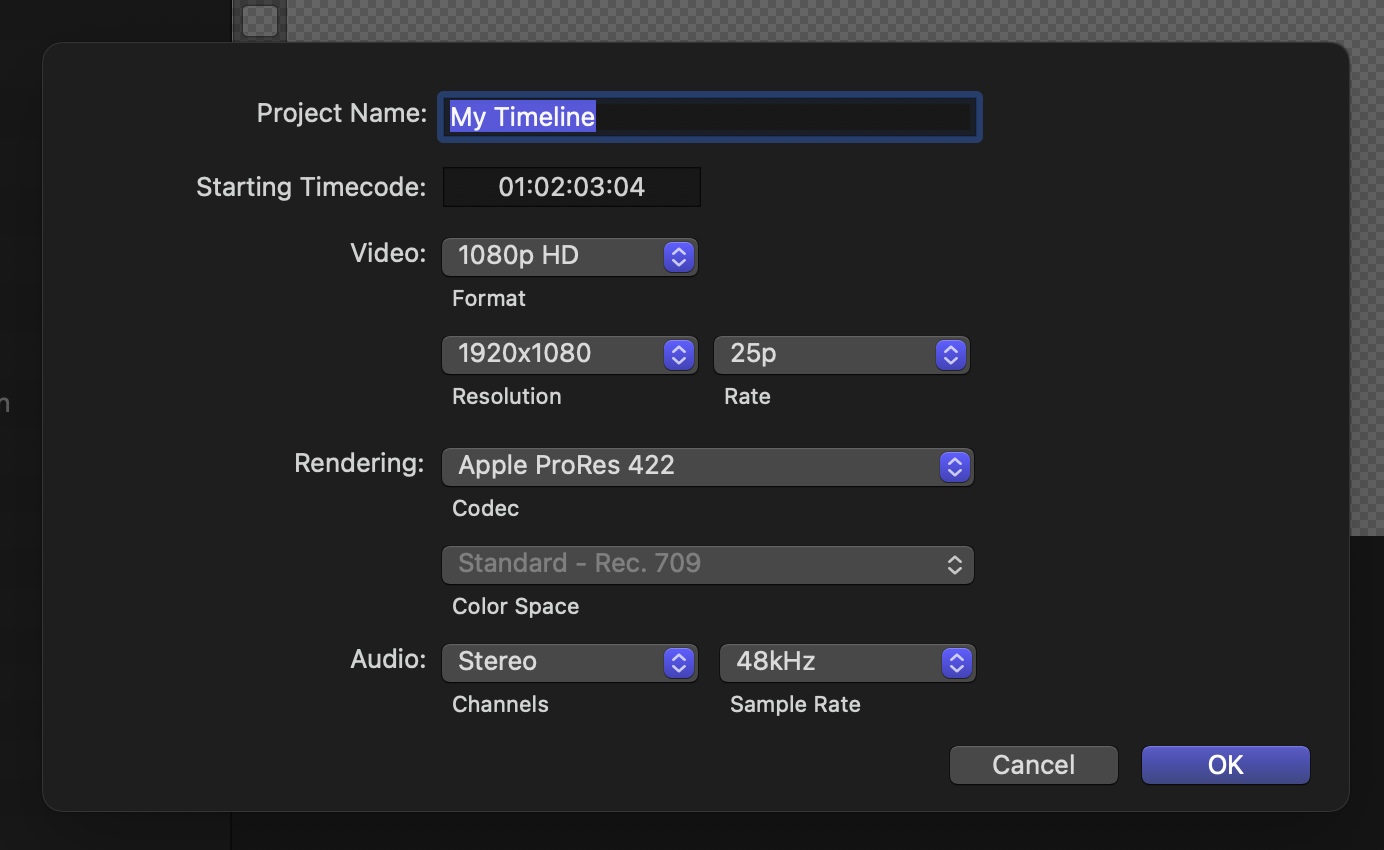
I have created a very simple Final Cut Project project.
It's **1920x1080 @ 25fps**, with a start timecode value of `01:02:03:04` (3723.16 seconds / 93079 frames):
It looks like this in Final Cut Pro:
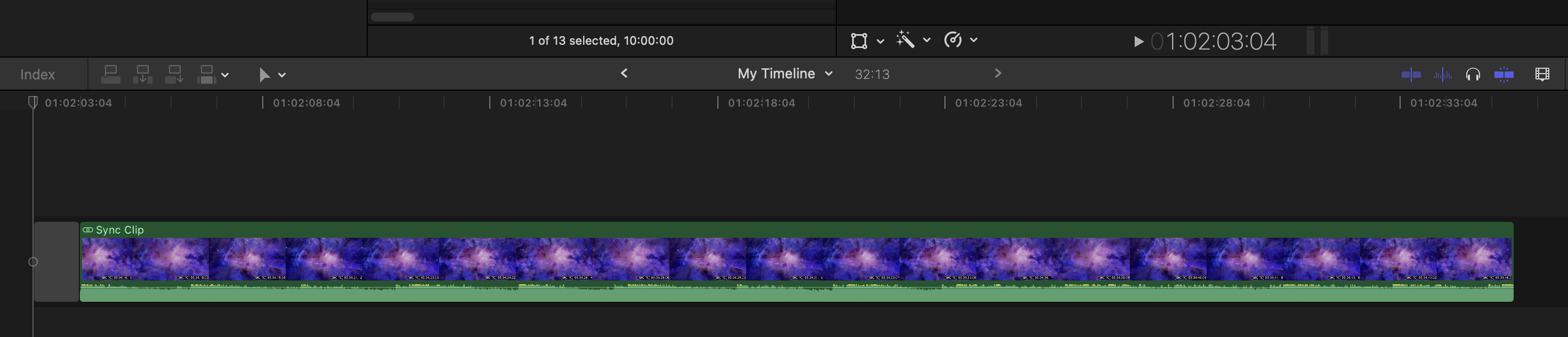
There's **1 second** of Gap at the start then a single Synchronised Clip.
The Synchronised Clip starts at `01:02:04:04` (3724.16 seconds / 93104 frames) in timeline/project time.
When you double click on it or **Clip > Open Clip** from the menubar, it looks like this:

On the Primary Storyline we have a Gap, and then a **1920x1080 @ 25fps** ProRes clip with audio.
Attached to the Gap is an audio clip underneath the Primary Storyline.
The Synchronised Clip starts at a `00:00:00:00` timecode value in timeline/project time.
The Gap duration is `00:00:41:22` (41.88 seconds / 1047 frames).
This means the Video Clips starts at `00:00:41:22` (41.88 seconds / 1047 frames) as well.
The duration of the Video clip is `00:01:00:00` (60 seconds / 1500 frames).
The start source timecode of the Video Clip is `03:04:05:06` (11045.24 seconds / 276131 frames).
The FCPXML of the timeline is (I've removed the bookmark data and metadata to simplify):
```xml
```
The FCPXML is really made up of two parts:
```xml
```
Looking at the `sequence` we can see:
```xml
```
Looking at the `tcStart`, we can do the maths and confirm it matches the timecode we're seeing in FCPX:
> 7446320 / 2000 = 3723.16 seconds (`01:02:03:04` / 93079 frames)
Within the `sequence` we have the `spine`. Within the `spine` he have our Gap and Synchronised Clip (the `...` signals things that have been removed for simplicity):
```xml
...
```
The Gap offset is the same as our `tcStart`:
> 37231600 / 10000 = 3723.16 seconds (`01:02:03:04` / 93079 frames)
If we look inside the `sync-clip`, the Video clip inside is actually an `asset-clip`.
```xml
...
...
```
If we look at the `offset`, it's the same as the Gap Duration:
> 104700 / 2500 = 41.88 seconds (`00:00:41:22` / 1047 frames)
If we look at the `start`, it's the same as the timecode we calculated earlier:
> 27613100 / 2500 = 11045.24 seconds (`03:04:05:06` / 276131 frames)
This is the start timecode of the source clip (i.e. the first frame of the clip) - `03:04:05:06`.
Now let's say we wanted to find the source timecode of the Video clip at the timeline/project timecode of `01:02:07:06` (3727.24 seconds / 93181 frames).
For now, we'll just cheat! We can double-click on the Synchronised Clip in Final Cut Pro, and use the **Source Timecode** window to get the answer:
> `03:04:19:07` (11059.28 seconds / 276482 frames).
We know that the point of interest (`01:02:07:06`) is 4.08 seconds from the start of the timeline/project because:
> 3727.24 - 3723.16 = 4.08 seconds
By going **inside** the Synchronised Clip in Final Cut Pro, we know that the timecode position we want is at `00:00:55:23` (55.92 seconds / 1398 frames) in timeline/container time.
We can confirm this with maths by doing:
> `asset-clip.offset` - `asset-clip.start` = (104700/2500) - (27613100/2500) = -11003.36 seconds
> 11059.28 - 11003.36 = 55.92
Let's now go back and have a look at the `sync-clip` again:
```xml
```
The `offset` value is:
> 37241600 / 10000 = 3724.16 seconds (`01:02:04:04` / 93104 frames).
This is the timeline/project timecode of where the `sync-clip` **starts**.
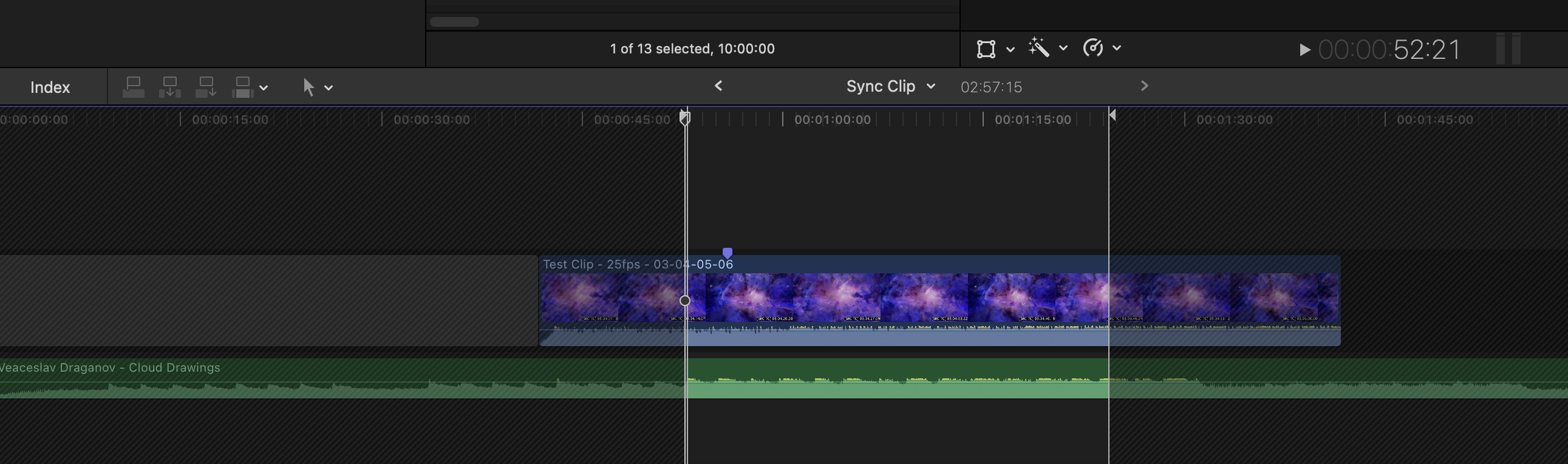
The `start` value is:
> 132100 / 2500 = 52.84 seconds (`00:00:52:21` / 1321 frames)
This value is the start of the visible range of the Compound Clip as used in the timeline/project:
So how do we get the source timecode of the Video Clip at `01:02:07:06` (3727.24 seconds / 93181 frames)?
We know that the `sync-clip` starts at `00:00:01:00` because, `sync-clip.offset` minus `sequence.tcStart`:
> `sync-clip.offset` - `sequence.tcStart` = (37241600/10000) - (7446320/2000) = 1 second
We know that the timeline/project timecode value of where the `sync-clip` starts in the timeline/project is:
> `sequence.tcStart` + (`sync-clip.offset` - `sequence.tcStart`) = (7446320/2000) + (37241600/10000) - (7446320/2000) = 3724.16 seconds
If we minus the source timecode we want (i.e. `01:02:07:06` / 3727.24 seconds / 93181 frames) from that value we get:
> 3727.24 - 3724.16 = 3.08 seconds (`00:00:03:02` / 77 frames)
So we know that the frame we're after is 3.08 seconds AFTER the start of the `sync-clip` in the timeline.
There's 10.96 seconds (`00:00:10:24` / 1316 frames) at the start of the `asset-clip` that's not visible on the timeline (i.e. the start of the clip has been trimmed).
To recap:
- `frameOfInterest` is the project/timeline value of the frame we're interested in = 3727.24 seconds / `01:02:07:06` / 93181 frames
- `sequence.tcStart` is the start timecode of the project/timeline = 7446320/2000s / 3723.16 seconds / `01:02:03:04` / 93079 frames
- `sync-clip.offset` is the timeline/project timecode of where the `sync-clip` starts = 37241600/10000s / 3724.16 seconds / `01:02:04:04` / 93104 frames
- `sync-clip.start` is the timeline/container timecode of the start of the visible range of the Compound Clip as used in the timeline = 132100/2500s / 52.84 seconds `00:00:52:21` / 1321 frames
- `asset-clip.offset` is the timeline/container timecode (inside the `sync-clip`) of where the `asset-clip` starts = 104700/2500s / 41.88 seconds / `00:00:41:22` / 1047 frames
- `asset-clip.start` is the start timecode of the source clip = 27613100/2500s / 11045.24 seconds / `03:04:05:06` / 276131 frames
Here's a hand-drawn image to visually explain:

To find the exact source timecode of the `asset-clip` at the timeline/project timecode of `01:02:07:06` (which we already know is `03:04:19:07` / 11059.28 seconds / 276482 frames), we can use the following formula:
> `asset-clip.start` + `frameOfInterest` − `asset-clip.offset` + `sync-clip.start` − `sync-clip.offset`
For example:
> (27613100/2500) + 3727.24 - (104700/2500) + (132100/2500) - (37241600/10000) = 11059.28
---
Let's try another example.
This time our frame of interest is: `01:02:14:06` / 3734.24 seconds / 93356 frames
```xml
```
If we use the same formula, we get:
> `asset-clip.start` + `frameOfInterest` − `asset-clip.offset` + `sync-clip.start` − `sync-clip.offset`
> (27613100/2500) + 3734.24 - 0 + (23300/2500) - (37291200/10000) = 11059.68 seconds / `03:04:19:17` / 276492 frames
---
Now to complicate things, let's do the same idea with a **Multicam Clip**.
Here's our FCPXML:
```xml
```
This time our frame of interest is: `01:00:00:18` / 3600.75 seconds / 86418 frames
Looking in Final Cut Pro's Source Timecode display we know the answer is: 875.21 seconds
We can use this same idea:
> `asset-clip.start` + `frameOfInterest` − `asset-clip.offset` + `sync-clip.start` − `sync-clip.offset`
However we need to go a few more layers deep:
> `asset-clip` > `sync-clip` > `multicam` > `mc-clip`
Confusingly, for the `multicam` node, instead of `offset` we use `tcStart`. Also, because there is no `start` value in the `multicam` node, we can just use 0.
The formula now looks like this:
> `asset-clip.start` + `frameOfInterest` − `asset-clip.offset` + `sync-clip.start` − `sync-clip.offset` + 0 - `multicam.tcStart` + `mc-clip.start` - `mc-clip.offset`
When we put in the numbers we get:
> (20573/24) + 3600.75 - (20573/24) + (20573/24) - (79/24) + (1679040/1920) - (3600) + 0 - (20495/24) = 875.21 seconds
---
!!!danger Under Construction
The below information is incomplete and most likely incorrect.
We will update the below once we get our heads around it better. Stay tuned.
!!!
Now to complicate things even further, let's try a **25fps clip** inside a **24fps timeline**:
```xml
```
If we click on this clip in the timeline, in the Inspector we can see:

Final Cut Pro is forcefully doing a rate conform from 25 converted to 24.
This time our frame of interest is: `01:02:08:07` / 3728.29 seconds / 89479 frames.
Looking in Final Cut Pro's Source Timecode display we know the answer is: `01:02:08:02` / 3728.08 seconds / 93202 frames
We can use this same idea, however the maths isn't quite right:
> `asset-clip.start` + `frameOfInterest` − `asset-clip.offset`
> (93079/25) + 3728.08 - (7148480/1920) = 3728.07333333333
Based on the `conform-rate` within the `asset-clip` we know we need to convert 25fps to 24fps.
According to the FCPXML [documentation](https://developer.apple.com/documentation/professional_video_applications/fcpxml_reference/story_elements/conform-rate):
> When your media has specific combinations of timeline frame rate and media frame rate, Final Cut Pro automatically applies rate conforming by converting the media frame rate to match the timeline frame rate, as shown in the Final Cut Pro rate conforming chart below. As a result, Final Cut Pro also adjusts the duration. When this occurs, the Rate Conform section appears in Final Cut Pro Video Inspector. Use the conform-rate element to indicate rate conforming.
>
> 
To convert from 25fps to 24fps, we need to adjust the playback speed so that every second of 25fps footage plays back in the same duration as it would at 24fps. Essentially, we're slowing down the 25fps footage to match the duration of 24fps footage.
In this case, Final Cut Pro is using **time-stretching**, where the duration of each frame from the 25fps footage is slightly extended so that the total number of frames still fits within the timeline of the 24fps project.
In this case, time-stretching doesn't mean that frames are being skipped or added - instead, the playback speed of each frame is slightly reduced so that all frames from the 25fps clip can be played back in a 24fps timeline without losing any frames. This is achieved by increasing the duration of each frame by a factor that corresponds to the ratio of the two frame rates.
To adjust the maths to reflect this time-stretching process and correctly calculate the "source" timecode of the clip in the 24fps project, we need to apply a conversion factor that reflects the slight extension in the duration of each frame.
This factor can be calculated as the ratio of the original frame rate to the new frame rate:
> Conversion Factor = (Original Frame Rate / New Frame Rate) = 25 / 24
You would then apply this conversion factor to the timecodes involved in the calculation to reflect the time-stretched duration of the footage in the 24fps timeline.
However, none of these combinations add up exactly:
> ( (93079/25) * ((100/2400) / (100/2500)) ) + 3728.08 - ( (7148480/1920) * ((100/2400) / (100/2500)) ) = 3728.07
> ( (93079/25) * ((24) / (25)) ) + 3728.08 - ( (7148480/1920) * ((24) / (25)) ) = 3728.07
> ( (93079/25) * ((100/2500) / (100/2400)) ) + 3728.08 - ( (7148480/1920) * ((100/2500) / (100/2400)) ) = 3728.07
> ( (93079/25) * ((25) / (24)) ) + 3728.08 - ( (7148480/1920) * ((25) / (24)) ) = 3728.07
This could be due to rounding errors, a logic error/misunderstanding of the above, or maybe Final Cut Pro is doing something entirely different internally.
I will update this information once I get my head around it.
---
Hopefully this now gives you a good deep understanding of how source timecode works in FCPXML.
If you have any questions, please post them in [Discussions](https://github.com/CommandPost/FCPCafe/discussions/categories/developer-discussions) and we'll do our best to answer!
---
!!!
Want to contribute? [Learn more here!](/contribute/)
!!!
---
## Discuss this page